TL;DR
Amazon seller accounts are usually suspended when key performance metrics such as Order Defect Rate, Late Shipment Rate, or cancellation rate cross Amazon’s allowed thresholds.
Many sellers miss early warning signs because Amazon’s Account Health dashboard shows the current status but does not clearly highlight trends that lead to suspension.
Common suspension triggers include performance metric failures, policy violations, poor customer experience, and intellectual property complaints.
Preventing suspension requires monitoring metrics early and fixing issues like late shipments, A-to-Z claims, or listing problems before they reach Amazon’s limits.
SellerQI helps sellers monitor account health in real time by tracking important metrics and showing clear Healthy, Warning, or At Risk indicators.
With real-time alerts and issue detection, sellers can resolve problems early, avoid suspensions, and maintain stable Amazon account performance.
You wake up, open your phone, and see an email from Amazon. Your selling privileges have been removed. No warning. No second chance. That's the reality for thousands of Amazon sellers every month.
What makes it even worse?
The warning signs were there weeks before; they just didn't know where to look. Amazon account suspension prevention isn't about scrambling to write a Plan of Action after the damage is done. It's about seeing the problem before Amazon's system decides for you.
Every suspension starts with a pattern such as high Order Defect Rate, A-to-Z claims stacking up, and late shipments nobody caught. These patterns build slowly, silently, across metrics that most sellers only check when something goes wrong.
This guide shows you exactly what Amazon is watching, which numbers can kill your account, and how SellerQI gives you real-time visibility to fix your Amazon account health score before it becomes a problem, so you resolve issues in days, not after weeks of lost sales.
Why did Amazon suspend my seller account?
Amazon suspends accounts to protect buyers. Their system is automated, so if they watch numbers. When those numbers cross a line, action is taken. Here are the four main categories for account suspension triggers:
1. Performance metric failures
Amazon tracks your Order Defect Rate, Late Shipment Rate, Cancellation Rate, and Valid Tracking Rate continuously. These aren't suggestions; they're thresholds. Cross them, and you risk suspension.
Practical example:
You're running a promotion, and orders spike. You can't fulfill everything on time. Your Late Shipment Rate rises from 2% to 5% over two weeks. Amazon flags your account. You never noticed because you were busy shipping.
2. Policy violations
It includes selling restricted products, inaccurate listings, and review manipulation. A single listing can trigger account-wide action.
Practical example:
You update a product title to improve rankings and accidentally include a claim like "FDA approved" without documentation. Amazon's system picks it up as a policy violation. Your listing gets suppressed, and if it's not resolved quickly, it escalates to an account suspension trigger.
3. Customer experience failures
A-to-Z Guarantee Claims, Negative Customer Experience (NCX) complaints, and Negative Seller Feedback are all tracked together. Too many of these and Amazon loses trust in you as a seller.
Practical example:
A product description doesn't match what the customer receives. Five buyers open A-to-Z claims in a month. Your ODR crosses 1%. Amazon suspends your selling privileges.
4. Intellectual property complaints
If a brand reports you for selling counterfeit or infringing products, Amazon acts fast. These complaints can come from legitimate brand owners or competitors trying to knock you off a listing.
Practical example:
A competitor files an IP complaint against your private label product claiming it infringes their trademark. Amazon removes your listing immediately and flags your account, even before any investigation.
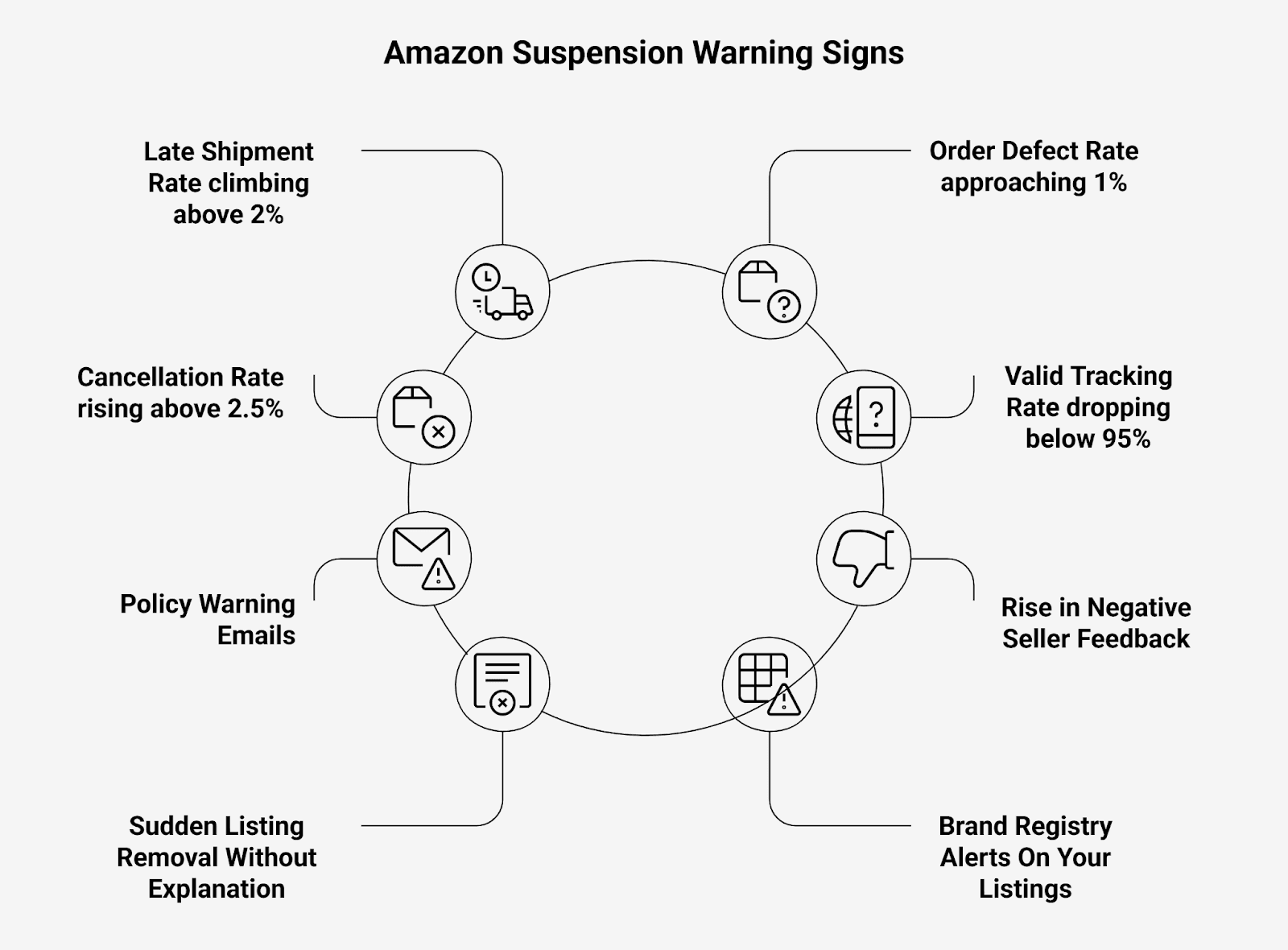
What are the early warning signs of Amazon suspension?
How do I check my Amazon account health?
Amazon gives you an Account Health dashboard inside Seller Central under Performance > Account Health. It scores your account and shows metric status like green, yellow, or red. It only shows you where you are, not where you're heading. It's a snapshot. You need trending data to catch problems forming.
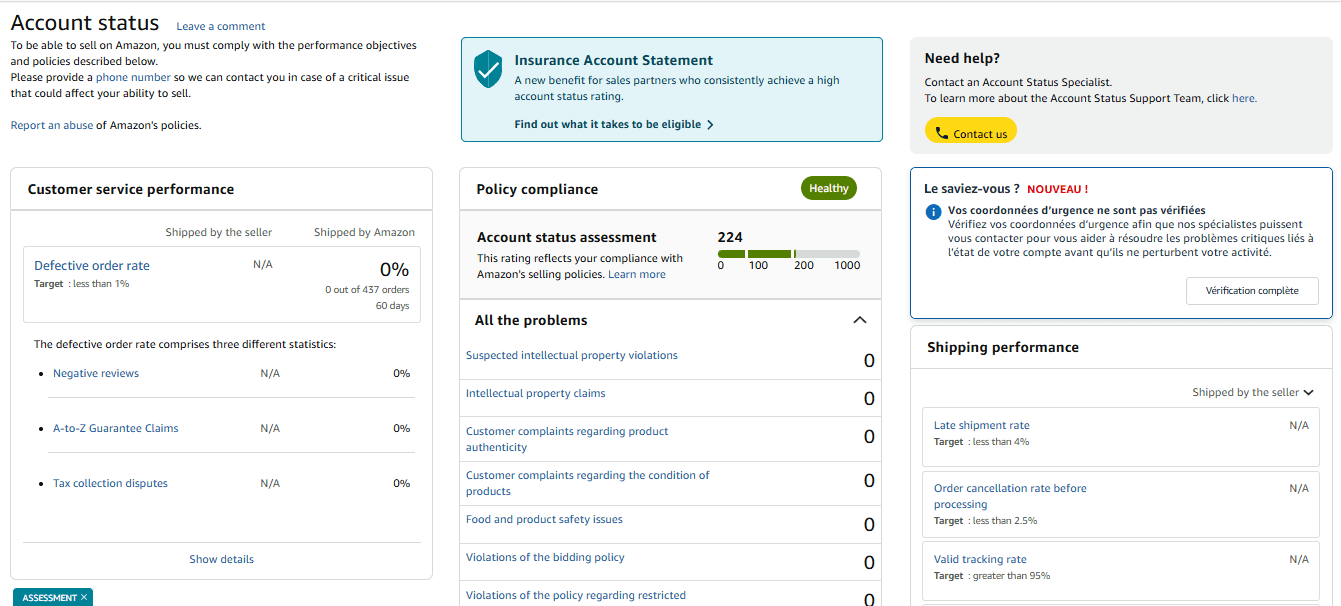
What Amazon's account dashboard shows you:
Account Status: Whether your account is at risk
Customer Service Performance: Response time, NCX score
Policy Compliance: Active violations or warnings
Shipping Performance: LSR, VTR, cancellation rate
Metric | Amazon’s Threshold | What Happens If You Cross It |
Order Defect Rate (ODR) | < 1% | Account suspension risk |
Late Shipment Rate | < 4% | Performance warning / suspension |
Cancellation Rate (CR) | < 2.5% | Selling privileges at risk |
Valid Tracking Rate | > 95% | Account health downgrade |
Customer Response Time | < 24 hours | NCX metric impact |
A-to-Z Guarantee Claims | < 1% | Account deactivation |
Negative Seller Feedback | Monitored continuously | Feeds directly into ODR |
But the challenge is that Amazon’s dashboard often shows these metrics after performance starts slipping, which leaves sellers reacting instead of preventing issues.
This is where an Amazon analytics platform like SellerQI helps by tracking the same metrics in real time and clearly showing when something is healthy, warning, or at risk so sellers can act before problems escalate.
What SellerQI shows you in real time?
SellerQI's Account Health Dashboard monitors every key metric continuously with live status indicators. When you log into SellerQI, each metric shows a clear Healthy, Warning, or At Risk status. You don't have to dig through Seller Central reports to piece together the picture; it's all on one screen, updating in real time.
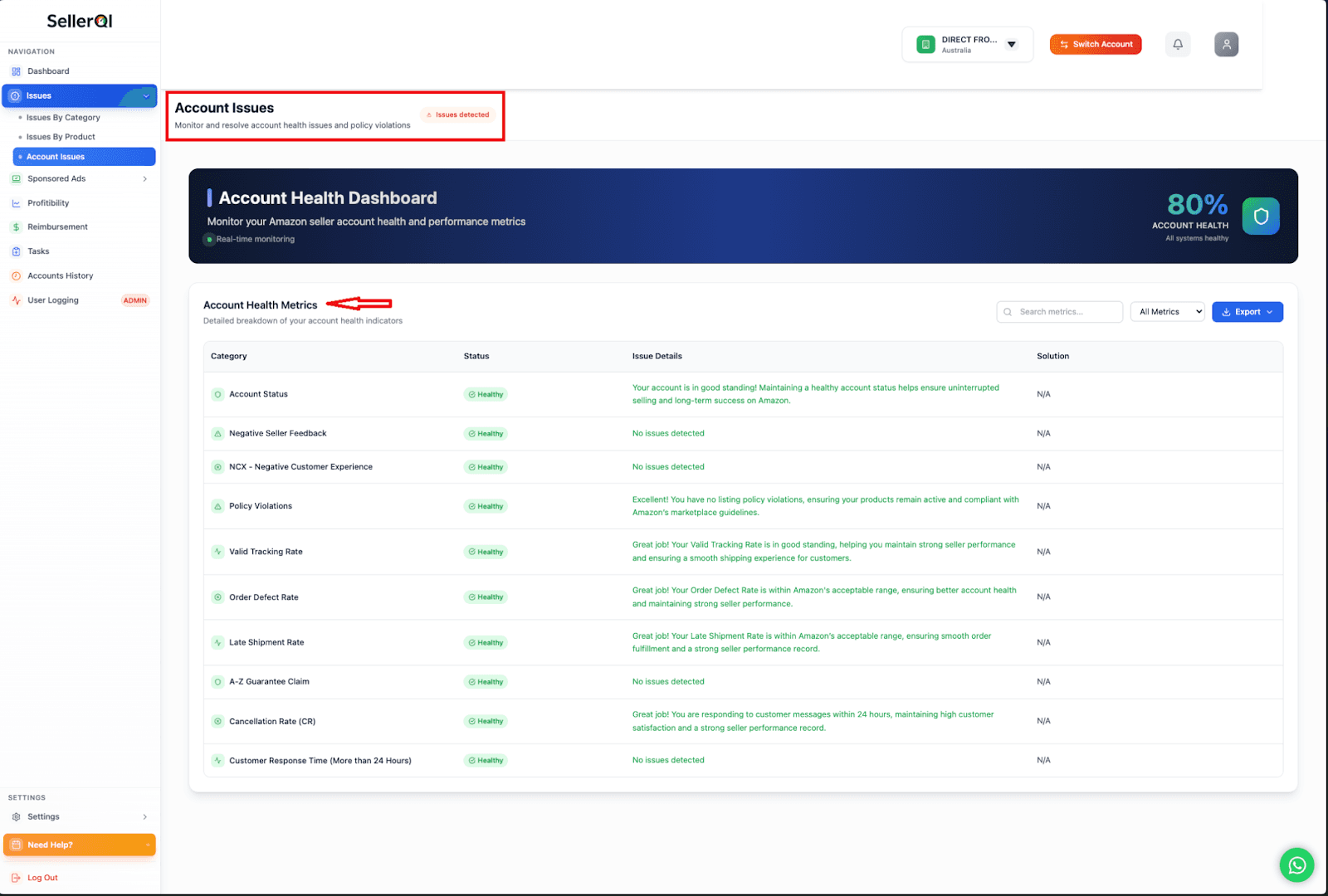
Proactive compliance means fixing problems before Amazon notices them. That's exactly what SellerQI is built to do. Most sellers only find out their account is in trouble when they receive the suspension email. By then, they're looking at a 2 to 4 week reinstatement process, a lost Buy Box, and revenue that doesn't come back.
SellerQI's Account Health Dashboard runs in real time. The moment a metric starts trending toward a threshold, saying your ODR is at 0.7% and climbing, you see it flagged. You have time to act. Here is a practical example of catching a late shipment problem early.
A seller using SellerQI notices their Late Shipment Rate has moved from 1.8% to 3.1% over 10 days. SellerQI flags it under Account Issues as Issues Detected. The seller investigates, finds a specific carrier consistently missing scan events, and switches to a backup carrier.
The result is LSR drops back below 2% before hitting Amazon's 4% threshold. No warning. No suspension. No appeal letter needed.
SellerQI shows a seller that three A-to-Z claims have been filed against the same ASIN in 30 days, all citing "item not as described." The seller checks the listing, finds the product images showing an older model, and updates them immediately. The result is that ODR stays below 1%. The seller avoids what would have become an account-level problem.
Final words
Amazon account suspension prevention comes down to one thing: visibility. If you can see a metric trending toward a threshold, you can fix it. If you're relying on Amazon's suspension email as your alert system, you're always reacting too late.
SellerQI gives Amazon sellers the real-time account health monitoring they need to stay ahead of suspensions. Every metric Amazon cares about is tracked continuously, with clear issue flags before they become account-level problems.
Don't wait for the suspension email. Start monitoring your account health with SellerQI.
FAQs
What metrics does Amazon use to suspend sellers?
Amazon monitors your Order Defect Rate, Late Shipment Rate, Cancellation Rate, and Valid Tracking Rate. Crossing any of these thresholds can trigger a performance warning or account suspension.
How do I avoid Amazon policy violations as a seller?
Regularly audit your listings for restricted claims, inaccurate descriptions, and compliance issues. Catching and fixing a single listing violation early can prevent it from escalating into an account-wide suspension.
What happens if Amazon suspends your account permanently?
A permanent suspension means you lose all selling privileges and access to your funds until the appeal is resolved. Reinstatement can take 2 to 4 weeks, and in some cases, Amazon may not reinstate the account at all.
What is Amazon's Order Defect Rate, and how does it affect my account?
Order Defect Rate measures the percentage of orders with defects, including A-to-Z claims, negative feedback, and chargebacks. If your ODR crosses 1%, Amazon can suspend your selling privileges immediately.