TL;DR
Amazon account health scores range from 0 to 1,000, and sellers must stay above 200 to avoid restrictions or suspension risk.
You can check your score in Seller Central under Performance > Account Health, and it should be reviewed at least twice a week.
Key metrics affecting your score include Order Defect Rate, Late Shipment Rate, customer experience metrics, policy violations, and response time to buyer messages.
If your score drops, identify root causes first, prioritize high-impact violations, fix problematic ASINs, and monitor daily until performance stabilizes.
Manual monitoring works for small accounts, but scaling sellers need automated tracking to avoid missing early warning signs.
SellerQI continuously monitors all critical health metrics, sends real-time alerts, and helps prevent small issues from turning into account-level risks.
You log into Seller Central and see that your Amazon account health score has dropped. That single number can stop you in your tracks. Whether you're sitting at 150 or watching a perfectly healthy account start to slip, a declining score is one of the most stressful situations an Amazon seller can face because the consequences are real. Listings get suppressed. Accounts get suspended. Revenue stops overnight.
The good news is that most account health problems are fixable, and many are preventable entirely. This guide breaks down exactly what your score means, how to check it, how to recover it, and how to make sure you never get blindsided by it again.
What is a good Amazon account health score?
The Amazon account health score is a numerical rating between 0 and 1,000 that reflects how well your account complies with Amazon's selling policies. Here is how the rating breaks down:
200 and above: Healthy. Your account is in good standing
100 to 199: At risk. Amazon may begin restricting your selling privileges
Below 100: Critical. Account deactivation is a real and immediate risk
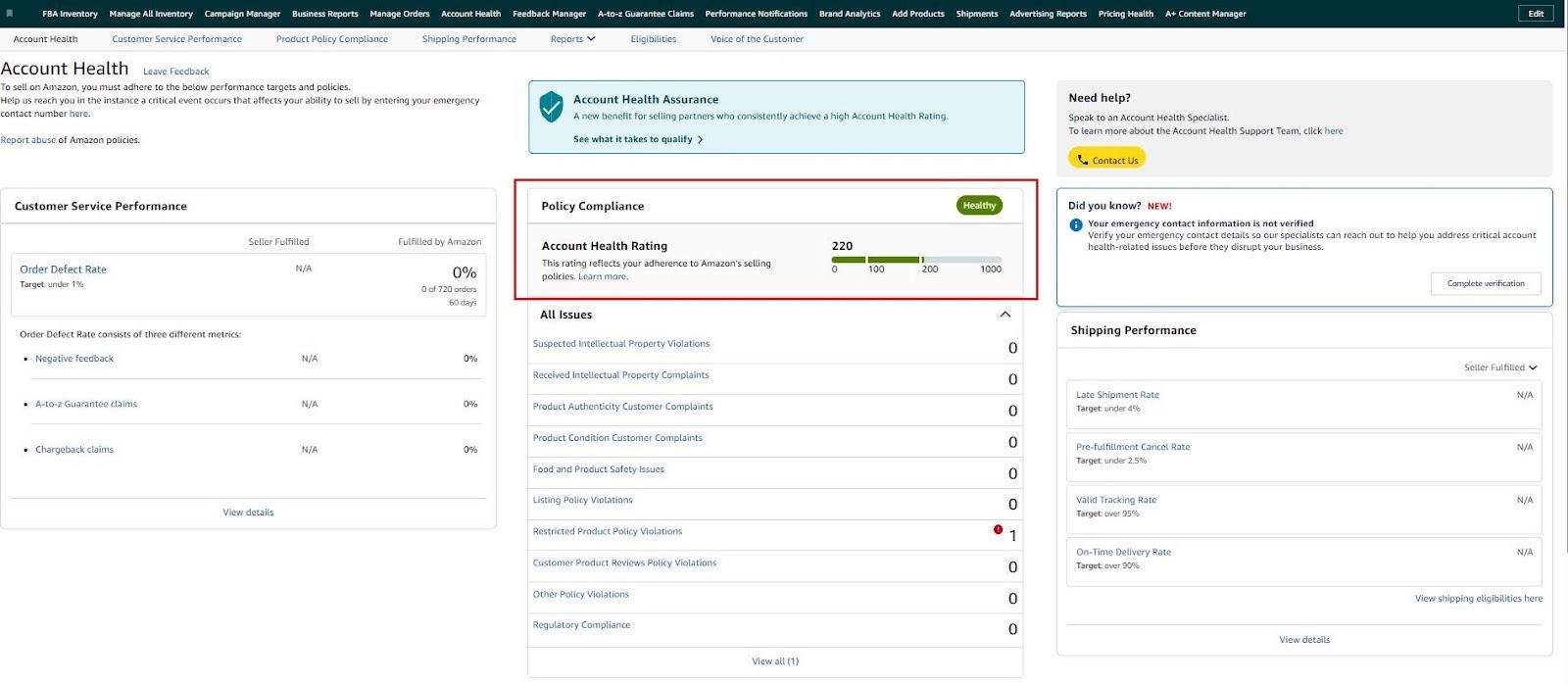
The target every seller should aim for is 200 or above. This gives you enough buffer to handle occasional issues without threatening your account status.
How do I check my Amazon account health score?
Finding your score is straightforward. Here is exactly where to look:
Log in to Amazon Seller Central
Go to the top menu and click Performance
Select Account Health from the dropdown
Your Amazon account health score appears at the top of the dashboard
Scroll down to review individual metrics, such as policy violations, customer experience score, and shipping performance which are all listed separately
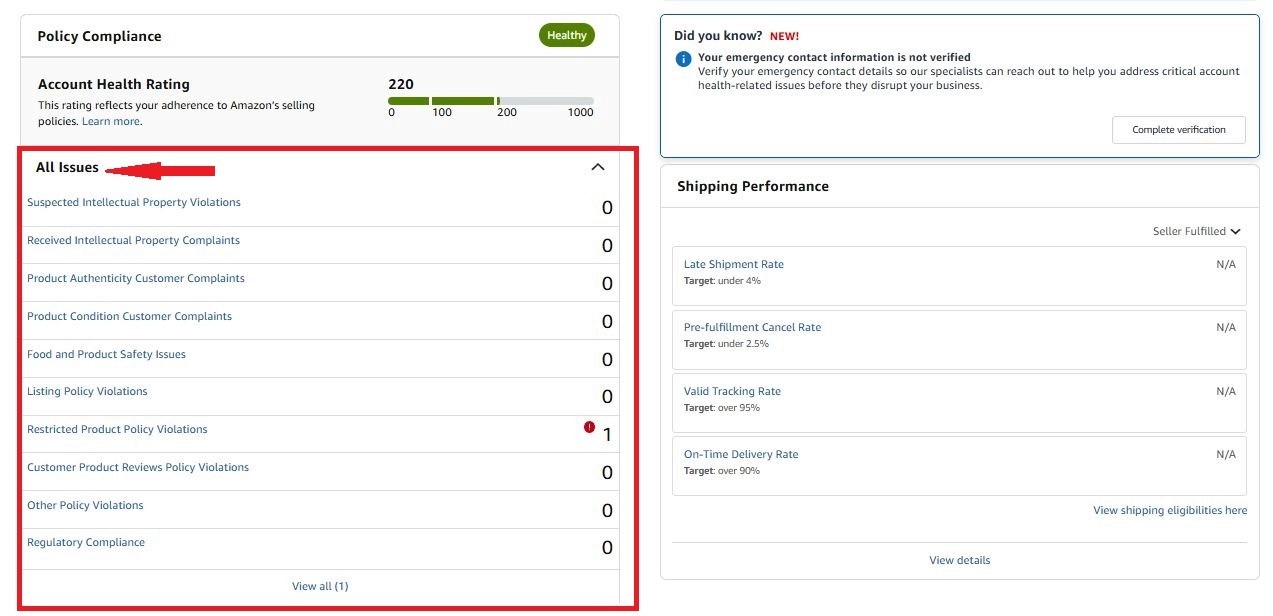
Make it a habit to check this dashboard at least twice a week. Issues can surface and escalate quickly, and early detection is always easier than damage control.
How to increase Account Health Rating on Amazon
Proactively improving your score before problems arise is always the better strategy. Here is how to increase Amazon account health rating over time:
Keep your Order Defect Rate below 1%: Your ODR includes negative feedback, A-to-Z claims, and credit card chargebacks. Each one damages your score. Monitor these weekly and respond to customer issues before they escalate to claims.
Maintain a Late Shipment Rate below 4%: Fulfill orders on time, update tracking promptly, and avoid pre-fulfillment cancellations. Shipping performance is one of the fastest ways to improve account health when managed consistently.
Respond to customer messages within 24 hours: Amazon tracks your response time. Falling behind on messages directly impacts your customer experience score, which feeds into your overall rating.
Audit your listings for compliance regularly: Restricted keywords, prohibited claims, and category policy violations can trigger flags without warning. Review your listings monthly against Amazon's current policies.
How to Fix Amazon Account Health Score
If your score has already dropped, here is how to fix Amazon health metrics and recover as quickly as possible:
Identify the root cause: Open your Account Health dashboard and categorize every issue: policy violations, customer experience flags, or shipping performance problems. Treat each category separately.
Prioritize by impact: Not all issues carry equal weight. Policy violations that result in listing removals or account warnings should be addressed first. High ODR issues come next.
Remove or relist problem ASINs: If a specific listing is generating disproportionate returns, complaints, or violations, consider temporarily removing it while you fix the underlying issue. A suppressed listing is better than a suspended account.
Request feedback removal where eligible: Negative feedback that violates Amazon's feedback policies, such as product reviews left as seller feedback, can be removed. Submit removal requests through Seller Central for any qualifying feedback.
Monitor daily until the score recovers: Once you have addressed the issues, check your dashboard daily. Scores update as metrics improve, but it takes consistent performance over time to restore Amazon seller health fully.
Fixing your account health manually: It requires consistent time, attention, and the ability to catch problems before they escalate. For sellers managing high order volumes or multiple ASINs, that level of manual oversight is rarely sustainable.
This is exactly where SellerQI removes the guesswork. Instead of checking your dashboard daily and hoping you catch issues in time, SellerQI monitors every metric that affects your Amazon account health score, automatically alerting you the moment something needs your attention.
How SellerQI Protects Your Amazon Account Health
Manually monitoring every metric that feeds into your account health score is not realistic at scale. SellerQI was built to handle that monitoring automatically. So issues are caught before they become violations, and violations are caught before they become suspensions. Here is what SellerQI monitors continuously on your behalf:
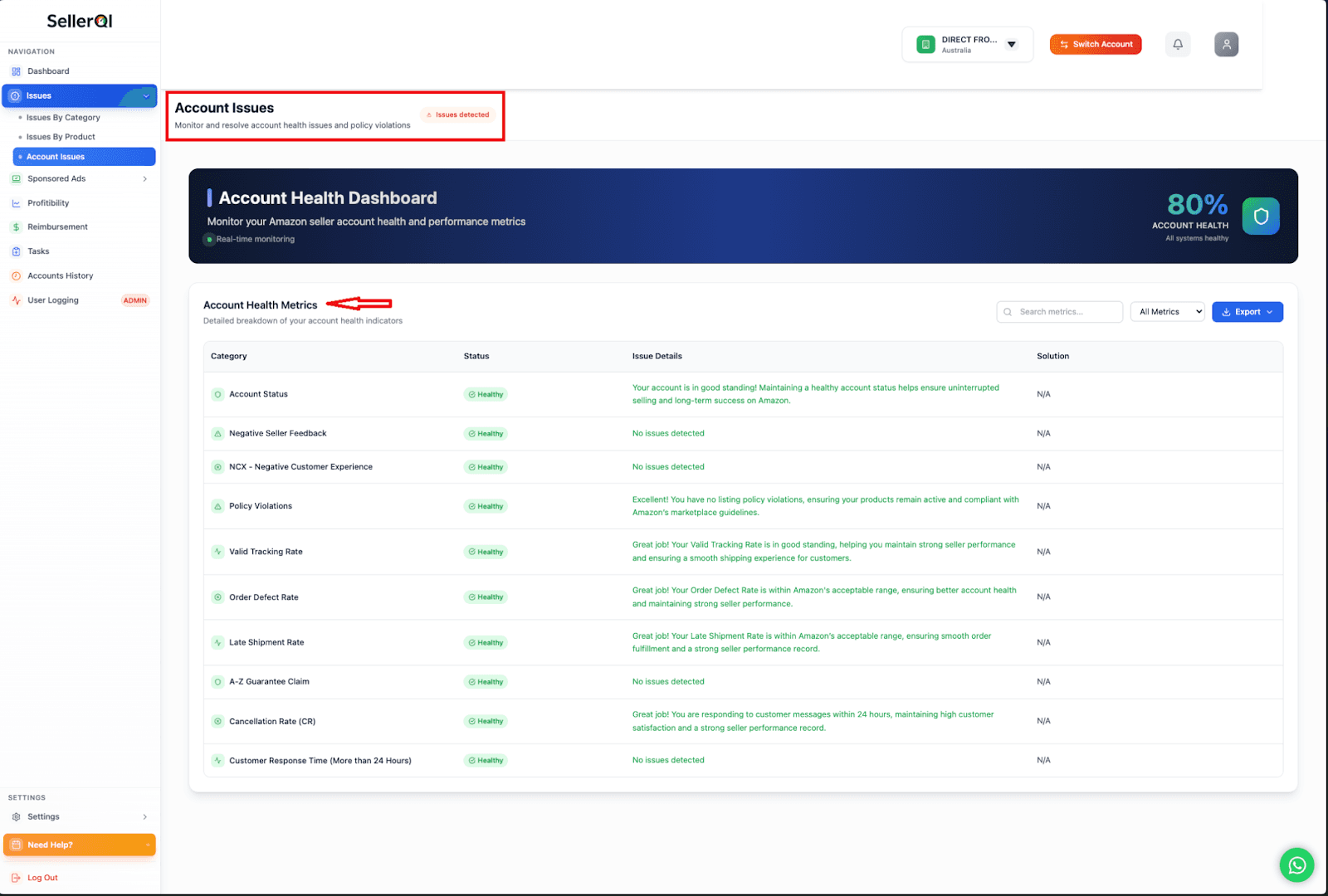
Order Defect Rate (ODR): Tracks negative feedback, A-to-Z claims, and chargebacks in real time, alerting you before your ODR approaches Amazon's 1% threshold.
Late Shipment Rate: Flags fulfillment delays early so you can resolve issues before they affect your shipping metrics.
Customer Experience Score: Monitors your NCX rate, highlighting return patterns, complaints, and refund spikes before they trigger Amazon's review process.
Policy Violation Alerts: Detects when Amazon flags a listing for compliance issues, giving you time to fix it before it escalates to a formal violation.
A-to-Z Claims Monitoring: Notifies you the moment a claim is filed so you can respond within Amazon's required timeline.
Seller Feedback Tracking: Sends instant alerts for negative feedback so you can respond quickly and request removal where eligible.
Valid Tracking Rate Monitoring: Ensures your tracking compliance stays above Amazon's minimum requirement across all orders.
Pre-Fulfillment Cancellation Tracking: Identifies inventory or listing accuracy problems before your cancellation rate becomes a metric issue.
Customer Message Response Monitoring: Tracks your response times to ensure you stay within Amazon's 24-hour compliance window.
The result is complete visibility into every metric that affects your Amazon seller health without logging into Seller Central multiple times a day.
Click here to run your free account scan today!
Wrapping up
Your Amazon account health score is not just a number; it is the single most important indicator of whether your selling privileges are secure. The sellers who stay healthy are the ones who monitor consistently, resolve issues quickly, and never let small problems compound into account-level risks.
So, now improve account health proactively, address violations the moment they appear, and use SellerQI to stay ahead of the metrics Amazon is watching. With SellerQI, your account's standing is entirely within your control.
FAQs
What happens when your Amazon account health score goes below 200?
Your account enters "At Risk" status. Amazon may begin restricting your selling privileges and will increase scrutiny of your account activity. Continued decline below 100 puts you at immediate risk of deactivation.
Can Amazon suspend my account for a low health score?
Yes. If your account health below 200 and the underlying metrics are not resolved, Amazon can deactivate your account. Suspensions can happen with relatively little warning once the score enters the critical range.
Why is my Amazon account health dropping with no violations?
Your score can decline due to high return rates, negative feedback, slow response times, or a rising NCX rate, even without formal policy violations. Check all metric categories in your dashboard, not just the violations tab.
How is Amazon’s account health rating calculated?
Amazon calculates your rating based on policy compliance, customer experience metrics (returns, complaints, refunds), and fulfillment performance (ODR, late shipment rate, cancellation rate). Each factor is weighted, and the combined result produces your numerical score.
Does order volume affect your Amazon account health score?
Not, but higher order volume increases your exposure to the metrics that do affect your score. More orders mean more opportunities for defects, late shipments, and customer complaints. This is why restoring Amazon seller health efforts becomes more critical as volume scales.