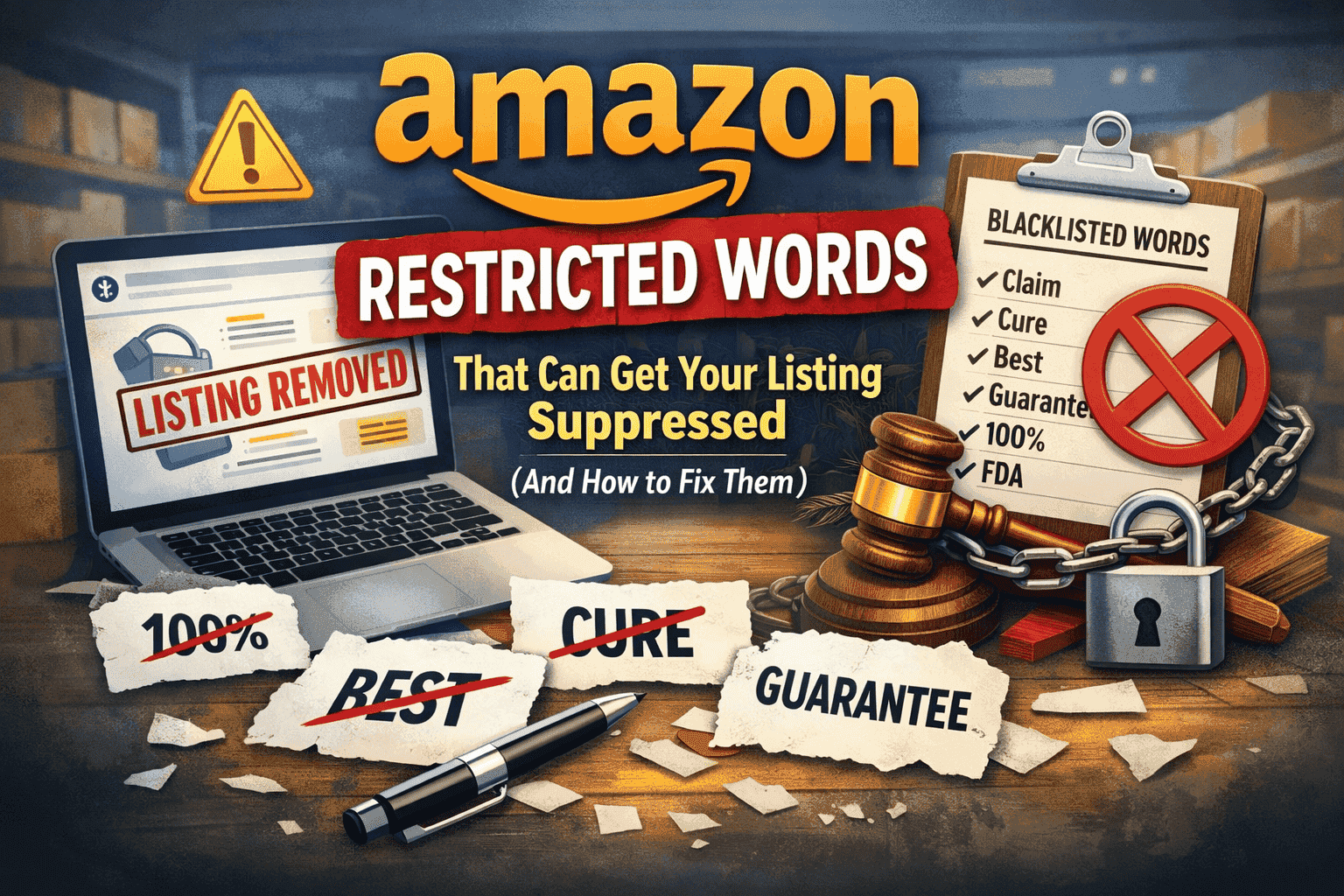
TL;DR
Amazon's restricted words can silently suppress listings, reduce visibility, and cause policy violations without warning.
Common triggers include health claims, absolute terms like “best,” unverified environmental claims, and restricted special characters.
Poorly optimized backend keywords, especially those under 450 characters, can hurt rankings and limit discoverability.
Many listing issues go unnoticed until sales drop or a product is suddenly suppressed.
Proactive listing audits help catch restricted words and compliance gaps before Amazon flags them.
Using automated tools like SellerQI makes it easier to fix issues early and keep listings live, compliant, and competitive.
You've spent hours perfecting your product listing. The images are crisp, the bullet points are compelling, and your description tells the perfect story. You hit publish, wait for the sales to roll in, and then.. nothing.
Or worse, you wake up to find your listing suppressed. No warning. No explanation. Just gone. This is usually because you used restricted words somewhere in your listing, and Amazon's algorithm flagged you faster than you could say "bestseller."
You had no idea those words were even problematic. This blog explains the hidden cost of Amazon’s restricted words, why they cause listing suppression, and how they silently hurt visibility and sales. It also shows how to spot and fix policy violations before they impact your account or rankings.
What is the hidden cost of restricted words?
Amazon has strict policies about what you can and cannot say in your listings. Use the wrong word, even innocently, and you risk triggering words that suppress Amazon listings, leading to visibility issues and policy actions.
Listing suppression (your product becomes invisible to customers)
Account health dings (which can lead to suspension)
Lost sales (every hour your listing is down costs you money)
Wasted ad spend (you're paying for clicks to a suppressed listing)
Competitor advantage (while you're fixing your listing, they're making sales)
Most sellers don't discover these issues until it's too late. You're either scrambling to fix a suppressed listing or wondering why your perfectly optimized listing isn't converting, not realizing that restricted words are triggering policy violations that hurt your visibility.
Understand Amazon’s restricted words in 2026
Amazon restricted words fall into several categories, and the rules get stricter every year. The Amazon prohibited words list 2026 has expanded significantly, covering everything from health claims to sustainability buzzwords to words that imply guarantees.
Common categories of restricted words include:
Health and medical claims: Words like "cure," "treat," "heal," "prevent," or "diagnose" are off-limits unless you're in specific approved categories. Even seemingly innocent phrases like "boosts immunity" or "anti-viral" can trigger violations.
Absolute claims: Amazon hates absolutes. Words like "best," "perfect," "guaranteed," "100%," or "#1" without proper qualification can get you flagged. Yes, even if your product genuinely is the best-selling in its category.
Prohibited substances: Any mention of substances Amazon doesn't allow, even if you're saying your product doesn't contain them can trigger flags. This includes certain chemicals, restricted materials, or controlled substances.
Time-sensitive language: References to "limited time," "sale," "now," or "today only" violate Amazon's pricing and promotion policies when used in listings.
Comparative claims: Directly comparing your product to competitors or other brands can land you in hot water, especially if you can't substantiate the claims.
Restricted claims Amazon monitors: Environmental claims like "eco-friendly" or "sustainable" without proper certification, child safety claims without compliance documentation, or performance guarantees without testing data.
What are the Common reasons Amazon listings get suppressed?
This is easier to understand with a simple example.
Example 1
Product title: A seller lists "Pack of 2 Pairs - Men's Cotton Terry Lined Ankle Socks - Breathable & Moisture Wicking."
Seems perfectly innocent, right?
Their bullet points contained special characters restricted by Amazon's guidelines. Maybe they used fancy symbols to make their listing stand out, stars, checkmarks, or special formatting characters. Amazon's system flagged it immediately.
The result: Listing suppressed. Zero visibility. Zero sales.
Example 2: The supplement trap
A seller uses the phrase "supports immune health" in their vitamin listing. It sounds reasonable that supplements do support health, right?
The problem: Without FDA approval or specific substantiation, health claims like this violate Amazon's policies. Words like "supports," "boosts," "enhances," or "promotes" when related to health functions are restricted.
The result: Policy violation. Potential listing removal.
Example 3: The keyword stuffing mistake
A seller's backend keywords total 380 characters. Amazon allows up to 500, so they should be fine, right?
Their backend keywords were flagged because they were too short. Amazon expects sellers to use at least 450 characters to maximize product discoverability. Using fewer means you're limiting your product's visibility and missing relevant search terms.
The impact: Lower search rankings. Fewer impressions. Lost sales opportunities.
How does SellerQI catch restricted words before Amazon does?
Traditional Amazon Seller Central doesn't proactively tell you about restricted words until you're already in trouble. You might get a vague notification about a policy violation, or worse, your listing just disappears without explanation.
AI-driven Amazon software for sellers catches these issues automatically by scanning listings for restricted words, formatting problems, and keyword gaps before Amazon flags them, preventing suppression and lost sales.
SellerQI's product optimization tool works differently. It acts like a protective shield between you and listing suppression, identifying issues before they become problems.
How does SellerQI identify restricted words?
SellerQI scans your every ASIN, every SKU, and surfaces everything that could hurt your listings. It's like having an Amazon policy expert review every product 24/7.
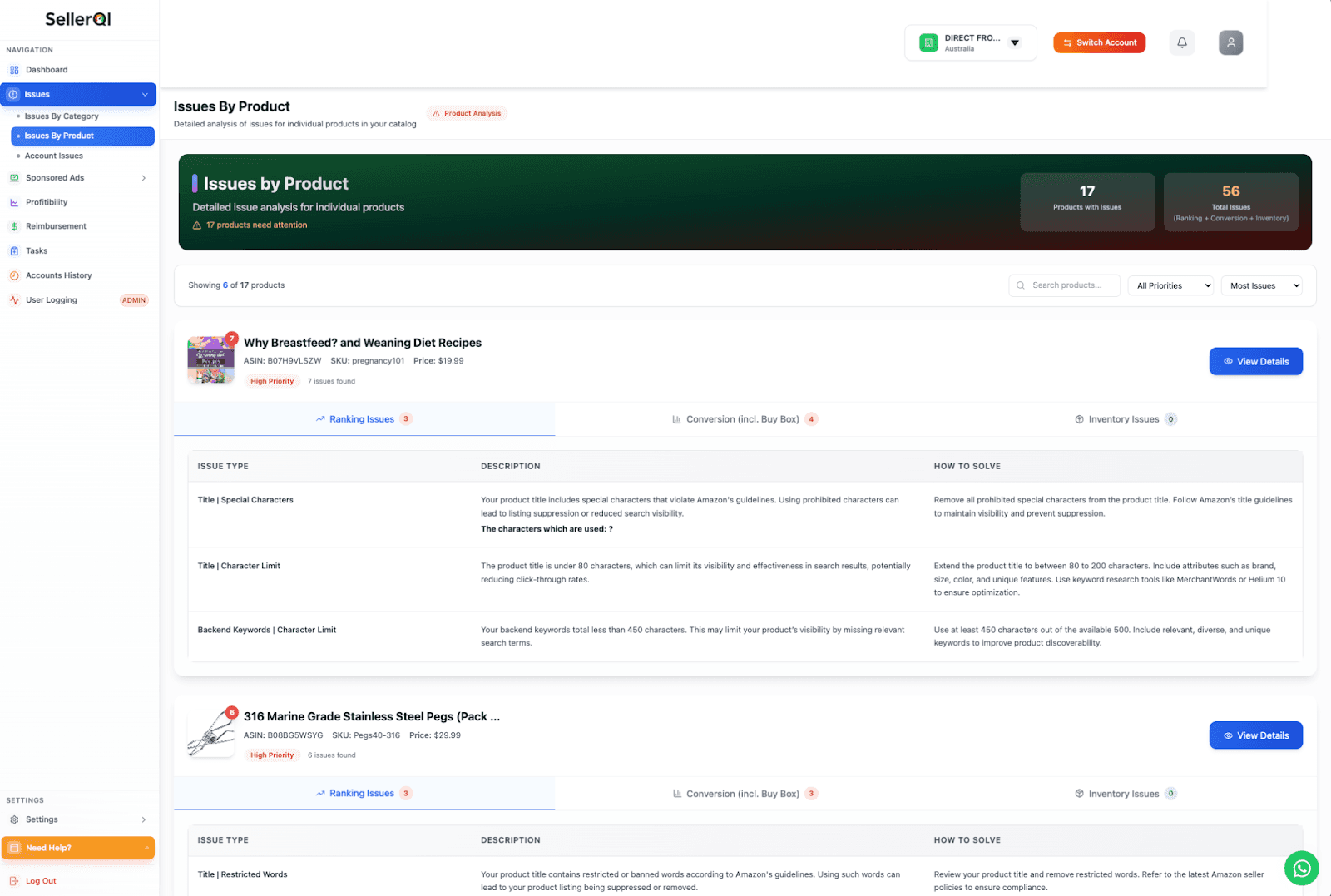
What SellerQI catches:
Bullet points with special characters: The system immediately flags restricted special characters that Amazon doesn't allow. You see exactly which characters are problematic and in which listings.
Backend keyword issues: SellerQI alerts you when your backend keywords are too short (under 450 characters) or too long (over 500 characters), helping you optimize for maximum discoverability.
Policy violation triggers: The tool identifies words and phrases that violate Amazon's content policies, health claims, absolute statements, and prohibited terminology before Amazon's algorithm catches them.
Listing compliance problems: Any content that doesn't adhere to Amazon's formatting requirements or style guide gets flagged with specific, actionable recommendations.
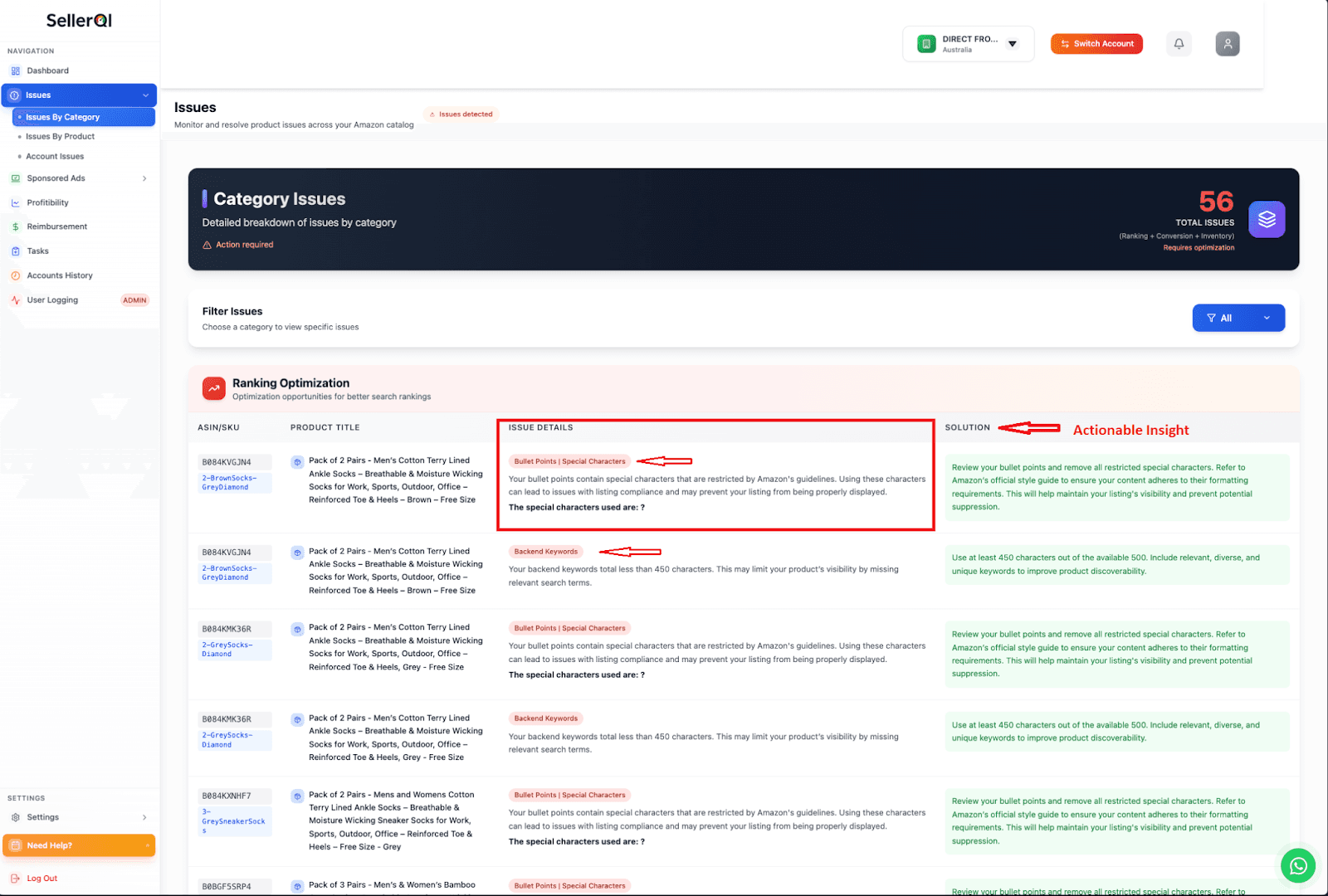
It gives sellers actionable insights that actually help. SellerQI does more than point out problems; it clearly shows what is wrong, why it matters, and the exact steps needed to fix Amazon policy violations, so sellers can act quickly and avoid listing suppression.
How to prevent Amazon listing violations before they happen
The best way to deal with restricted words is to catch them before they cause problems.
1. Audit your listings regularly
Don't wait for Amazon to tell you something's wrong. Use SellerQI to run regular audits of your entire catalog. The product optimization tool gives you a comprehensive view of all issues across all your ASINs and SKUs.
Set a schedule, weekly or bi-weekly, to review flagged issues. Address them systematically, starting with the highest-impact problems such as listings with restricted words that could cause suppression.
2. Understand the context
Not all restricted words are banned in all contexts. "Organic" is fine if you have proper certification. "Hypoallergenic" is acceptable if you can substantiate it. "Waterproof" is allowed if you have testing documentation.
The key is understanding what Amazon requires for each claim. SellerQI helps by flagging potentially problematic terms so you can verify whether you have the proper documentation and certifications.
3. Focus on backend keywords
This is where sellers leave the most money on the table. Your backend keywords should be:
Between 450-500 characters (use the full allowance)
Relevant and diverse (cover different search terms customers might use)
Free of restricted words (no brand names, no ASIN numbers, no offensive terms)
Without repetition (don't use the same keyword multiple times)
SellerQI's backend keyword analysis shows you exactly where you're falling short and how to maximize your search visibility.
4. Keep special characters out
Amazon's style guide is clear: stick to standard punctuation. No fancy symbols, no emojis, no special formatting characters. SellerQI automatically flags these, so you can clean up your listings before Amazon notices.
5. Stay updated on policy changes
Amazon updates its restricted words list regularly. What was acceptable last month might violate policy today. SellerQI keeps its database current, so you're always working with the latest guidelines.
Why you can’t ignore listing optimization anymore
Amazon's marketplace is more competitive than ever. With millions of sellers fighting for visibility, you can't afford to have anything holding your listings back. What sellers risk in 2026:
Algorithm changes favor compliant, well-optimized listings
Amazon's enforcement is stricter and more automated
Customer trust depends on accurate, policy-compliant product information
Your competitors are optimizing, and if you're not, you're falling behind
SellerQI's product optimization feature ensures you're not just compliant but competitive. Everything that's keeping your listings from performing gets surfaced in one place, with clear guidance on how to fix it.
Wrapping up
Amazon restricted words are one of the most common and costly reasons sellers lose visibility, sales, and account health. A single unverified claim, special character, or poorly optimized backend keyword can quietly trigger listing suppression and stall performance.
In 2026, staying compliant is a core part of winning on Amazon. The sellers who succeed are the ones who catch issues early, fix them fast, and keep their listings aligned with Amazon policy changes. If you want to stop guessing, reduce risk, and protect every ASIN from avoidable violations, start with a proactive listing audit.
Start a free account scan with SellerQI and review your listings regularly, clean up restricted words, and make compliance part of your growth strategy today.
FAQs
What are Amazon restricted words?
Amazon restricted words are terms that violate content policies that can result in listing suppression or account violations.
Will fixing restricted words hurt my conversion rate?
No, fixing restricted words actually improves performance. You can replace restricted terms with accurate, policy-compliant descriptions that build customer trust and maintain strong conversion rates.
How many characters should my backend keywords be?
Use 450 to 500 characters in your backend keywords; Amazon allows up to 500, but using at least 450 ensures maximum product discoverability and search visibility.
Can I claim my product is "eco-friendly" on Amazon?
Only with proper environmental certifications and documentation to substantiate the claim; unverified environmental terms like "eco-friendly" or "sustainable" violate Amazon's policies.