TL;DR
CTR (Click-Through Rate) shows how often people click on your ad or listing compared to how often it’s shown. A higher CTR means more clicks and more sales.
To improve CTR, focus on optimizing your product titles, using high-quality images, and offering competitive pricing.
Reviews and ratings play a key role in improving CTR. Positive feedback builds trust and encourages clicks.
Choose relevant keywords that match what your customers are looking for to increase CTR.
Regularly test ad creatives and track your CTR using Amazon’s reports to see what works and adjust accordingly.
Hey Amazon Seller!
Looking to boost your rankings and drive more sales? The secret might be simpler than you think. Let’s talk about Click-Through Rate (CTR). A higher CTR means your product gets noticed more, and when your product is seen more, your chances of being recommended by Amazon increase.
More clicks = more chances to convert visitors into buyers.
How do you achieve that? This guide will tell you what CTR is, why it’s so important, and give you some easy tips to improve it. We’ll also share the actionable tips and strategies that you can easily implement to boost your CTR, helping your product listings stand out, attract more customers, and ultimately drive more sales.
What is Click-Through Rate?
Click-Through Rate (CTR) is a key metric that shows how often shoppers click on your ad or product listing compared to how often it’s shown. It’s a percentage of people who click after seeing your product.
Formula:
CTR = (Clicks ÷ Impressions) × 100
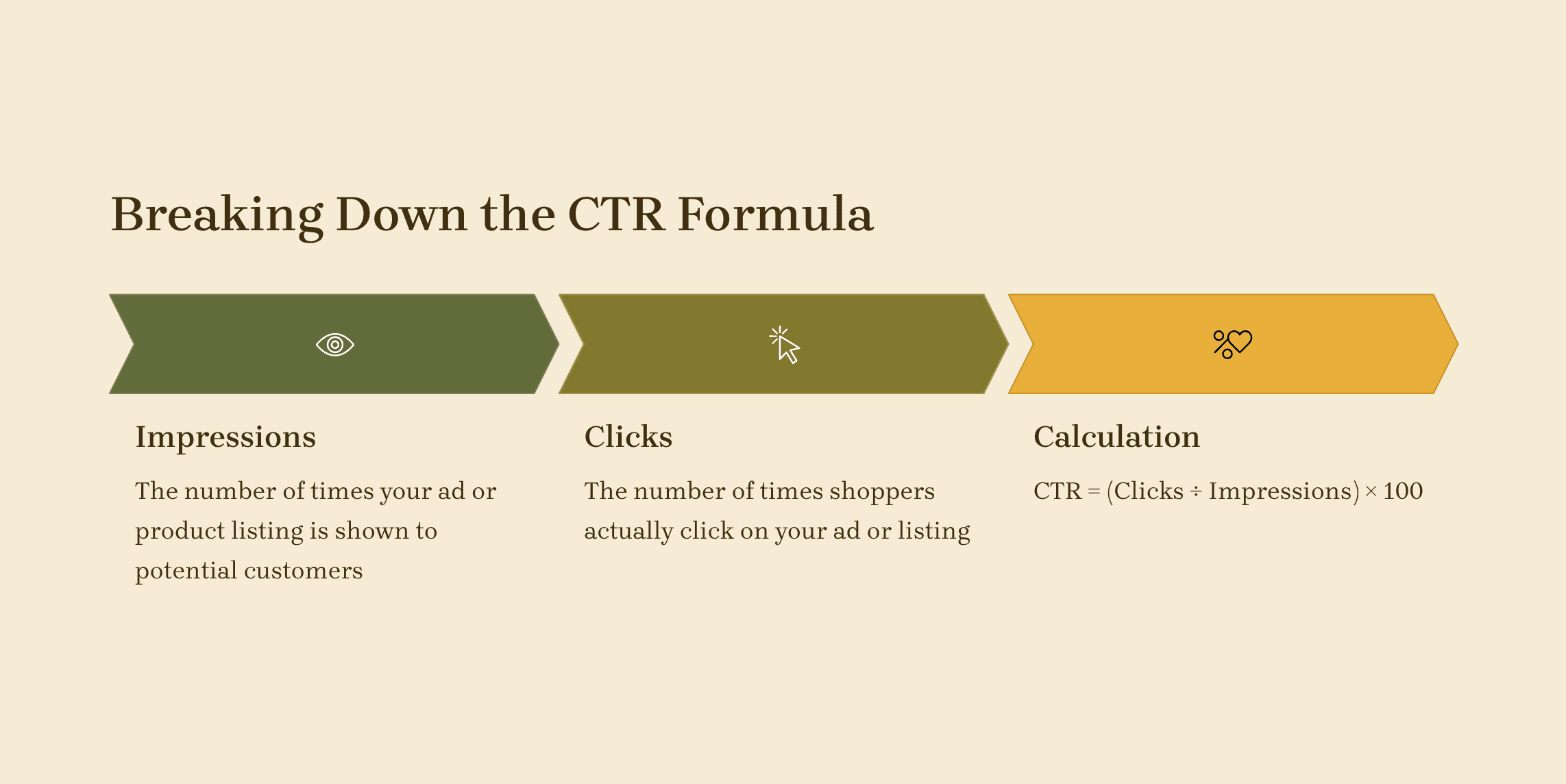
Understanding the CTR formula
For paid traffic (PPC), you can check CTR in the Amazon Advertising Console. Here, you’ll see CTR alongside other important metrics like impressions, clicks, and conversions for each campaign, ad group, and keyword.
You can also download Advertising Reports in Seller Central (Reports > Advertising Reports > Performance Over Time) to track CTR trends over time.
For organic traffic, the Search Query Performance Report in Brand Analytics (available to brand-registered sellers) shows impressions and clicks for search terms driving organic traffic to your product.
Why does CTR vary across categories and ad formats?
CTR varies by product category and ad format. Highly competitive categories, like electronics, often have a lower CTR, while niche products can perform better. Sponsored Products ads generally have a higher CTR than display ads since they appear directly in search results.
To improve your CTR, focus on creating clear, engaging listings and ads, using strong keywords, and optimizing your images to attract clicks.
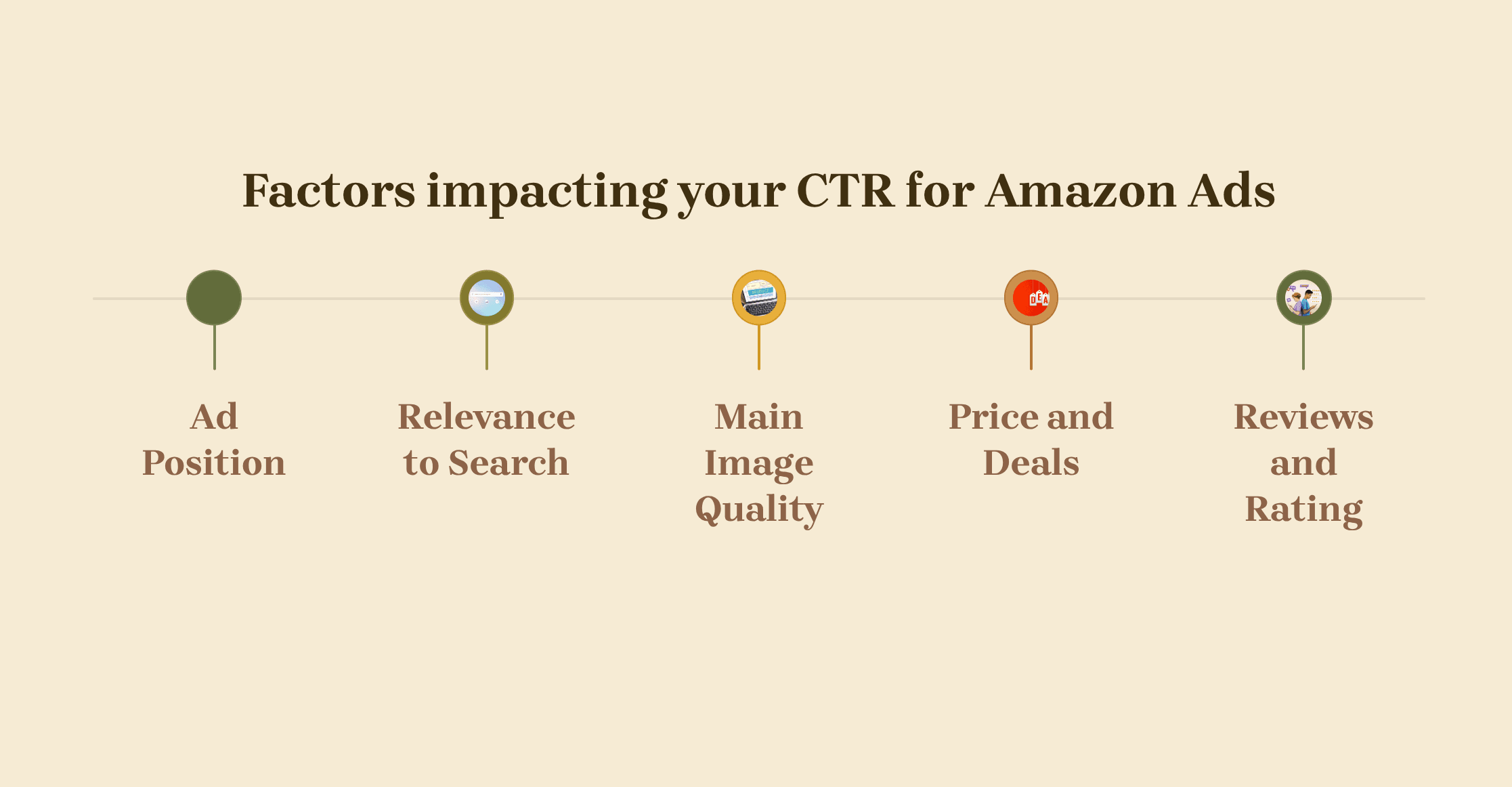
Factors that affect your CTR for Amazon ads
Why CTR matters for your Amazon business
Direct impact on sales: CTR is crucial because more clicks mean more chances to convert those visitors into customers. A higher CTR shows that your ad or listing is attracting attention, leading to more potential sales.
Algorithmic boost: Amazon’s A9 algorithm takes CTR into account. Listings with a higher CTR are more likely to be ranked higher in search results, giving them more visibility and boosting the chance of additional clicks and sales.
PPC efficiency: A higher CTR means your PPC campaigns are more efficient. When you get more clicks for less spend, you lower wasted ad spend and improve your return on investment (ROI). This can lead to better performance and lower advertising costs.
By improving your CTR, you're not only boosting visibility but also making your ads and listings more effective, ultimately driving more sales and maximizing your marketing budget.
How are CTR and conversion rate connected?
It’s important to look at both CTR and conversion rate when measuring how well your listing is performing.
High CTR, low conversion:
If you're getting a lot of clicks but few sales, it means your product image and title are grabbing attention, but something on the product page (like poor A+ content, bad reviews, or an uncompetitive price) is turning potential buyers away.Low CTR, high conversion:
If your CTR is low but your conversions are high, it means the people who do click are likely to buy. The issue here is that you’re not getting enough traffic. Focus on improving your main image and title to attract more clicks.
In the end, a high CTR is the first step to success. It tells both Amazon and customers that your product is worth considering, helping boost sales and improve your organic ranking on Amazon.
What is a “good” CTR on Amazon?
A “good” Click-Through Rate (CTR) on Amazon varies depending on your product category, ad type, and goals. It’s not about hitting one specific number, but understanding how your CTR compares to the industry benchmarks for your specific situation.
Generally, a CTR of 0.5% or higher is considered good for Amazon ads. However, top-performing sellers often see CTRs of 1% or even higher, especially in competitive niches or with branded keywords. If your CTR is consistently below 0.3%, it’s a sign that your ad or listing may need some adjustments.
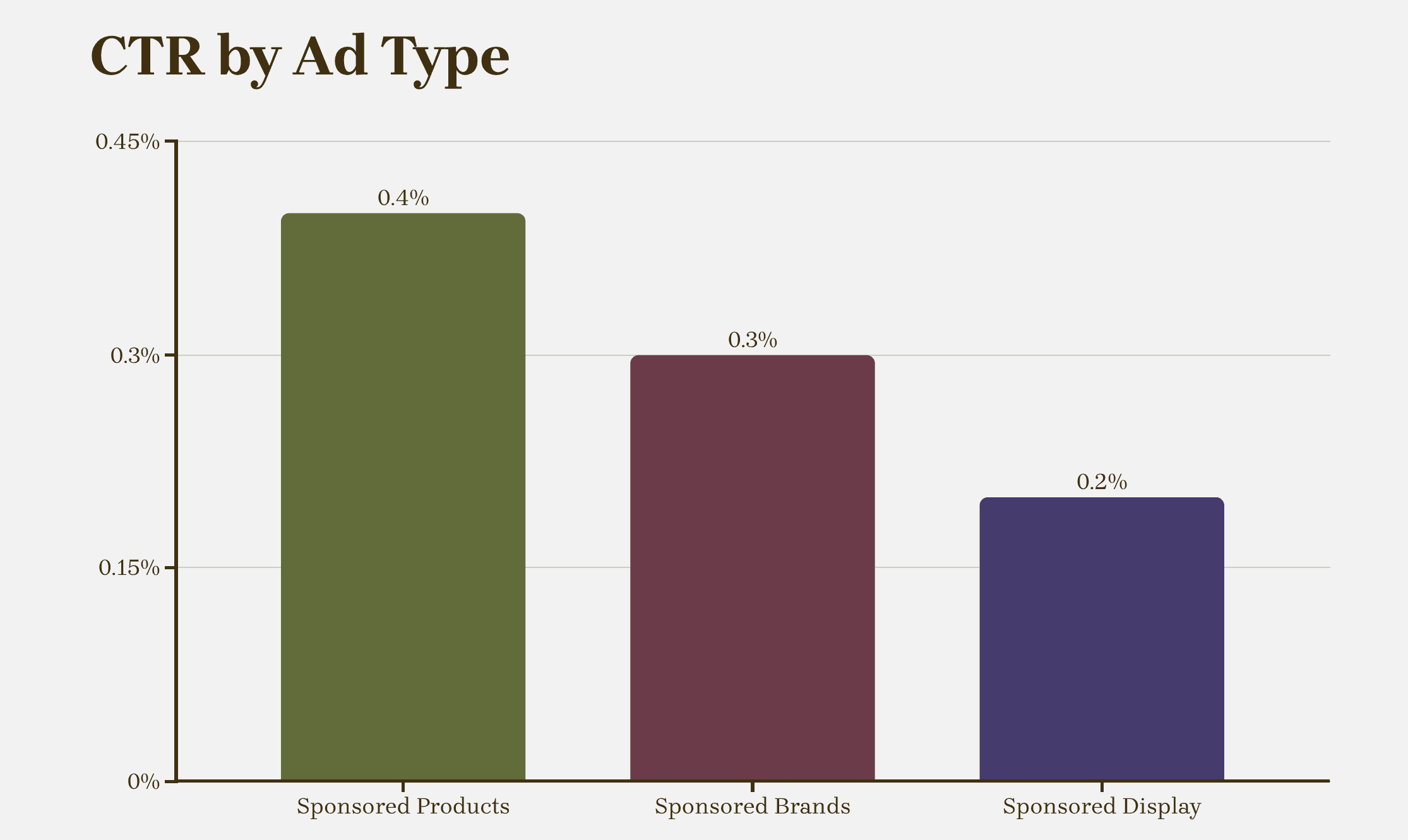
CTR differs by Amazon ad type
Source: Sellermetrics
CTR by Category:
CTR can vary greatly depending on the category. In competitive markets like beauty or supplements, CTR can exceed 1%. In more commoditized categories like office supplies or bulky items, you might see CTRs closer to 0.2%-0.3%.
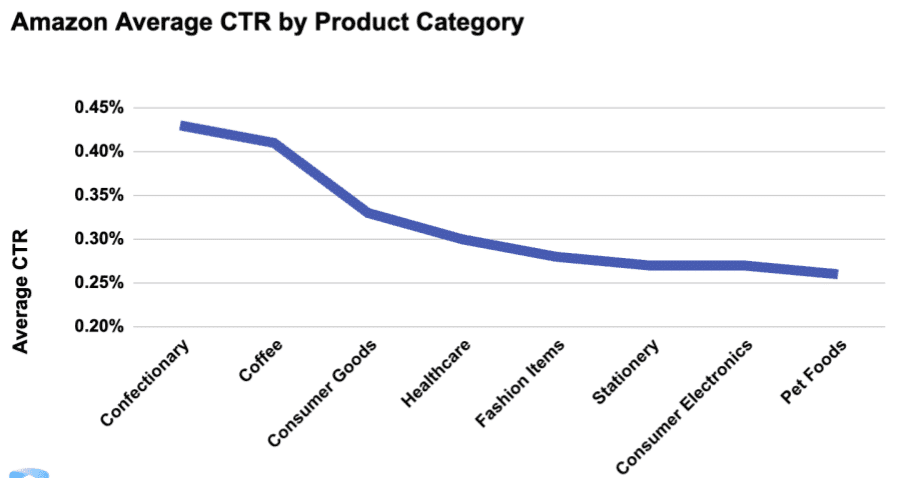
Category-wise average CTR
Source: Sellermetrics
The key is to know your benchmarks and continually optimize for better performance.
How to improve your Amazon CTR
#1 Optimize product title
Your product title plays a huge role in improving your CTR on Amazon. It’s often the first thing customers see, so it needs to grab attention and provide clear, relevant information about your product. A strong title helps customers quickly understand what your product is and why they should click on it.
Here’s how to optimize your titles:
Put important info first: Since Amazon truncates titles on mobile, place your key details (like brand, keywords, and key features) at the beginning.
Balance readability with keywords: Avoid stuffing your title with too many keywords. Make it easy to read by separating important details with dashes or pipes.
Highlight your product's benefits: Include key attributes like size, color, material, or unique features.
Follow Amazon's style: Use capital letters for each word, numerals for numbers (e.g. "2" instead of "two"), and avoid promotional phrases like "Best Seller."
Keep it concise: While Amazon allows up to 200 characters, shorter titles (around 80 characters) often perform better, especially on mobile.
By optimizing your product titles, you’ll make it easier for customers to find your product and improve your CTR.
#2 Upgrade main image
Your main image is one of the most important factors in improving your CTR. It’s the first thing potential customers notice when they browse Amazon, and a great image can make the difference between a click and a pass.
Here’s how to upgrade your main image:
Use high-quality, professional images: Ensure your main image is clear, high-resolution, and shows your product from the best angle. Blurry or low-quality images can turn customers away.
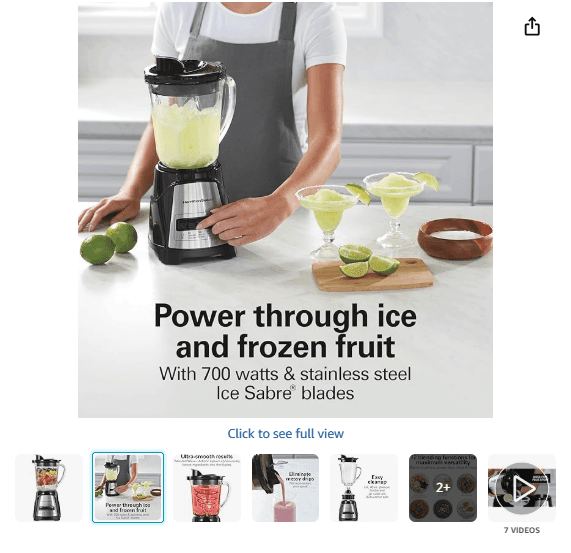
Example of a professional, high-quality image
Show the product in use: If possible, showcase your product in a real-life scenario. For example, if you’re selling a kitchen gadget, show it in action, like chopping vegetables. This helps customers visualize how the product fits into their daily lives.
Stick to Amazon’s guidelines: Your image should have a white background and display only the product, avoid including extra props, text, or logos.
Highlight key features: Use the image to highlight important features of your product, especially those that solve a customer pain point.
Ensure consistency: Make sure your main image matches the quality and style of your other images for a professional, cohesive look.
#3 Improve your reviews & ratings
Customer reviews and ratings are key to building trust and improving your CTR. When shoppers see positive feedback, they’re more likely to click and buy. Here’s how to strengthen your reviews and ratings:
Encourage positive reviews: After a purchase, send a polite follow-up email asking customers to leave feedback. You can also use Amazon’s automated review request feature through Seller Central.
Enroll in Amazon Vine: Amazon Vine helps get verified reviews from trusted reviewers, which boosts credibility and social proof.
Respond to reviews: Engage with customers by thanking them for positive reviews and addressing concerns in negative reviews. This shows potential buyers that you’re active and care about customer satisfaction.
Improve customer experience: Deliver a great product and excellent service to ensure happy customers who are more likely to leave positive reviews.
With stronger reviews and ratings, you not only build trust with shoppers but also signal to Amazon that your product is valuable, leading to better visibility and higher CTR.
#4 Competitive pricing
Pricing is a key factor in attracting clicks and improving your CTR on Amazon. If your product is priced too high or too low, it can hurt your chances of getting clicks and sales.
Here’s how to use competitive pricing to boost your CTR:
Monitor competitor prices: Keep an eye on what similar products are priced at. Use Amazon's tools to track competitor pricing and ensure you’re within a competitive range.
Use repricing tools: These tools can help you automatically adjust your prices based on market changes, ensuring you stay competitive without manually checking every day.
Ensure Buy Box eligibility: To win the Buy Box and get more clicks, your price must be competitive. If your price is too high, you may lose the Buy Box, which can limit your visibility.
Offer discounts and deals: Adding coupons or limited-time offers can make your product stand out and attract more clicks.
By adjusting your pricing strategy, you can make your listing more appealing, increase your CTR, and ultimately boost your sales.
#5 Keyword relevance
Choosing the right Amazon product keywords is crucial to improving your CTR on Amazon. However, it's not just about stuffing your listing with as many keywords as possible. Keyword relevance is key to ensuring your product shows up in front of the right audience.
Here’s how to improve keyword relevance:
Use specific, relevant keywords: Focus on terms that directly relate to what your customers are searching for. For example, instead of just “blender,” try “quiet blender for smoothies.”
Match customer intent: Think about why a customer is searching for your product. Use keywords that reflect their needs or problems, like “easy-to-clean” or “durable.”
Avoid irrelevant keywords: Don’t include keywords that don’t match your product. This can harm your CTR as it leads to irrelevant clicks, which won’t convert.
Use backend keywords: Amazon’s backend keyword fields help improve discoverability. Fill them with additional relevant keywords that don’t fit naturally in the listing.
By choosing the right keywords and matching them to customer intent, you’ll increase the likelihood of your product being clicked on and purchased.
#6 Test ad creatives
Testing your ad creatives is crucial to improving your CTR on Amazon. By experimenting with different visuals, copy, and formats, you can discover what resonates best with your audience and boosts engagement.
Here’s how to test ad creatives effectively:
Experiment with images: Try using different angles, backgrounds, or product close-ups. A simple change in the visual can make a huge difference in customer interest.
Vary your headlines and copy: Test different wording in your ad copy to see which version catches more attention. For example, try emphasizing benefits over features or highlighting discounts.
Test ad formats: Experiment with Sponsored Products, Sponsored Brands, and Sponsored Display ads to see which format performs better for your products.
Monitor performance: Use Amazon’s reporting tools to track the performance of each variation. Look for higher CTR and engagement to determine which creative works best.
By regularly testing your ad creatives, you can refine your approach and keep improving your CTR, ultimately driving more traffic and sales to your Amazon listings.
How to track and measure CTR improvements
Tracking your CTR improvements is essential to know if your efforts are actually working. Luckily, Amazon provides tools that make this simple and actionable.
Key reports in Seller Central and Advertising Console: In your Amazon Advertising console, you can monitor CTR alongside impressions, clicks, and conversions for each campaign, ad group, and keyword. These metrics show you which ads are performing well and which need adjustments.
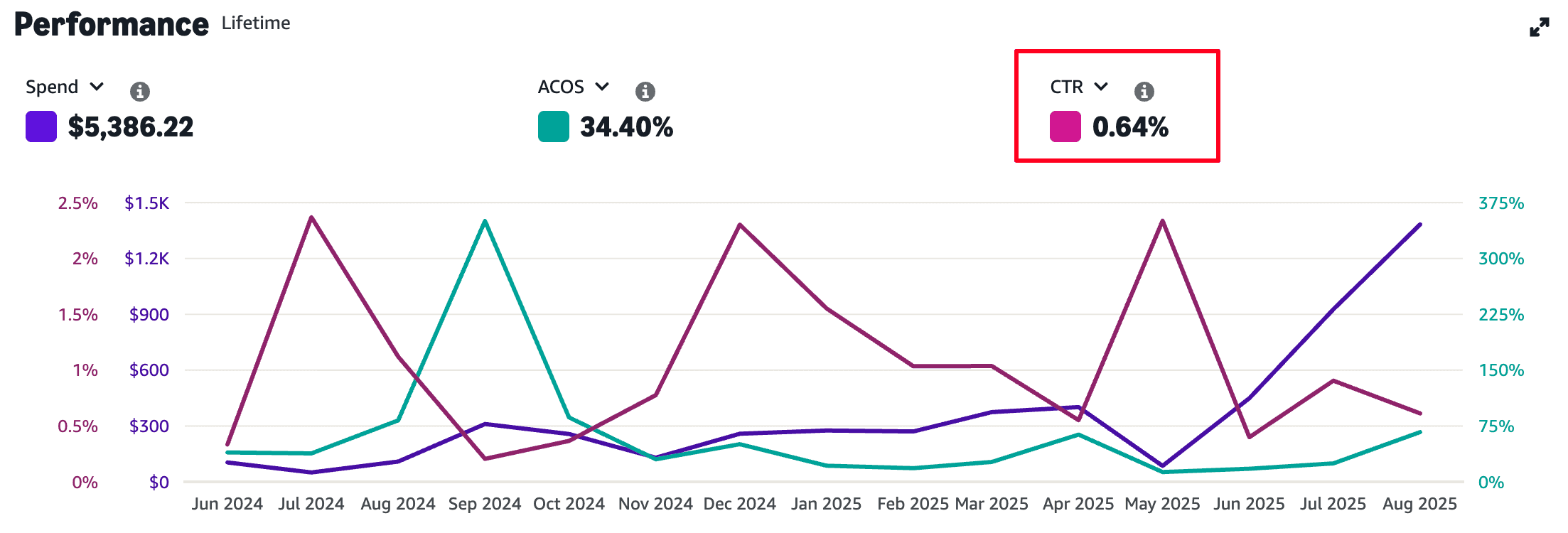
Amazon Ad Performance showing CTR data
You can also download detailed reports under Reports > Advertising Reports > Performance Over Time in your Amazon Seller Central to see trends over days, weeks, or months.
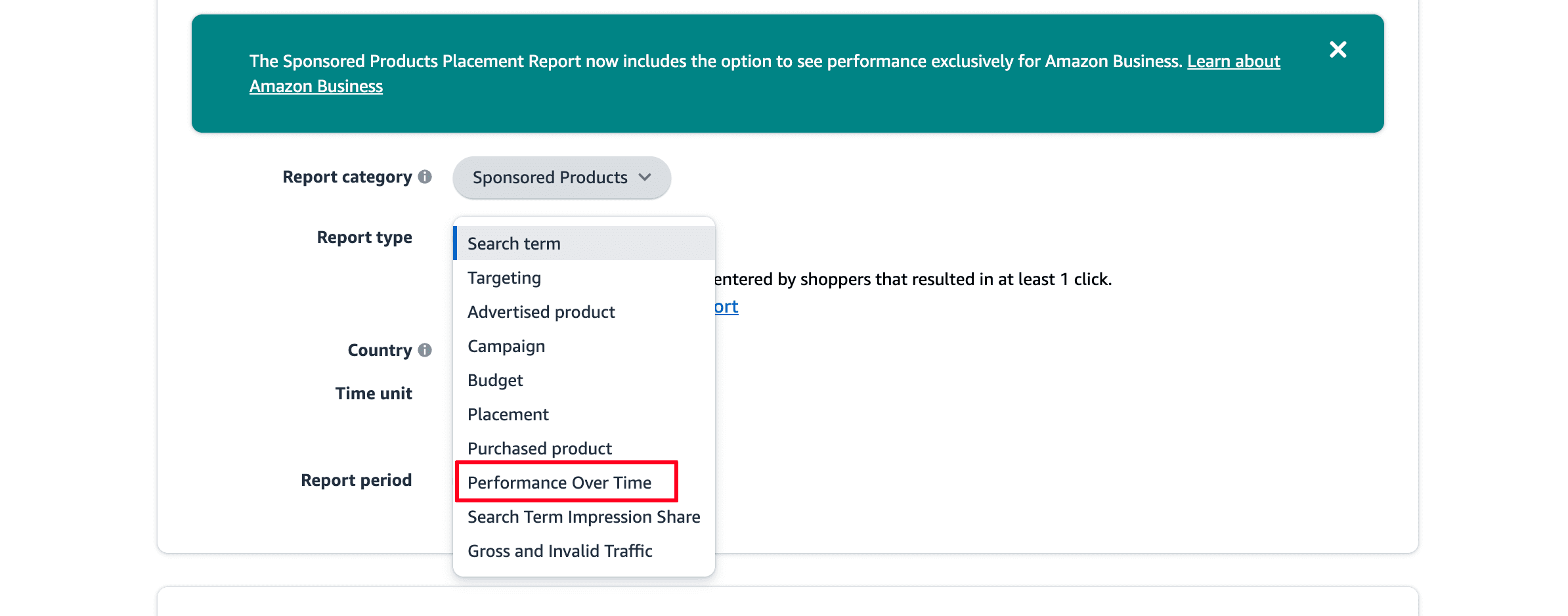
Performance Over Time Report for CTR
A/B testing: You can create variations of product titles, images, or ad copy and run them simultaneously to see which version gets more clicks. By comparing CTR between these versions, you can make informed decisions about what resonates best with customers.
Combine report insights with A/B testing to track your progress over time. Look for steady increases in CTR and correlate them with conversion rates.
This ensures you’re not just attracting clicks but bringing in the right customers who are likely to buy. Consistent tracking helps you refine your strategy and maximize both visibility and sales.
Need help improving your CTR?
Improving your Amazon CTR is a key step toward boosting visibility and driving more sales. By optimizing your product titles, images, pricing, and keyword relevance, you can significantly increase clicks and conversions.
Don’t forget to test your ad creatives and track your performance with tools like Amazon’s reports and A/B testing to see what works best. SellerQI provides AI-powered insights and actionable recommendations to boost your CTR and sales.