
TL;DR
Nearly 30% of Amazon sellers lose revenue due to hidden account issues that surface-level dashboards fail to explain, making continuous account monitoring essential.
SellerQI works as an Amazon account diagnostics system, scanning listings, ads, inventory, and financials to detect errors, inefficiencies, and risks before they impact performance.
The platform fixes silent listing suppressions, reduces wasted PPC spend, and surfaces high-converting keywords so sellers can scale what actually drives profit.
ASIN-level profit tracking replaces spreadsheets, helping sellers clearly see which products to scale, fix, or discontinue based on real profitability, not revenue.
Automated reimbursement tracking recovers money lost to damaged, missing, or incorrectly refunded inventory, improving cash flow without extra sales or ad spend.
With inventory alerts and a centralized task list, SellerQI helps sellers move from reactive problem-solving to proactive, data-driven account management.
Nearly 30% of Amazon sellers lose revenue each month due to unnoticed account issues, according to seller audits and reimbursement studies.
And you know what the worst part is?
Most don’t realize it’s happening. Selling on Amazon today is no longer just about listings and ads; it’s about managing a complex system of compliance rules, algorithms, fees, and constant changes.
Surface-level dashboards show numbers, but they don’t explain what’s actually going wrong. That’s why sellers need deeper visibility through reliable Amazon account monitoring software. SellerQI steps in as an Amazon account analysis software built to uncover errors, profitability gaps, and hidden Amazon seller performance issues.
This guide gives you a practical walkthrough to help you see your Amazon account clearly and fix what truly matters.
What is SellerQI?
SellerQI is a cloud-based, AI-driven Amazon account monitoring and diagnostic platform built to help sellers identify hidden account issues before they impact performance. Unlike traditional dashboards that only show numbers, SellerQI focuses on what is going wrong and what needs attention right now.
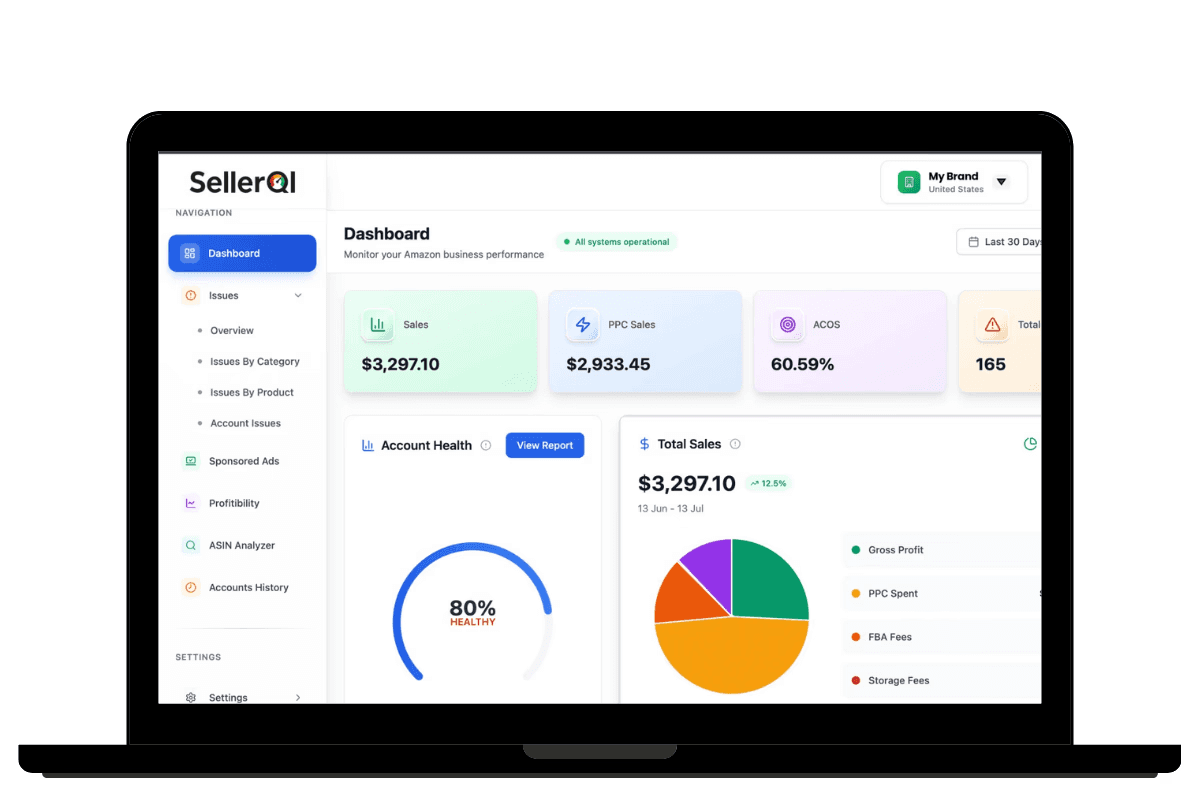
Most Amazon tools present metrics like ACoS, sales, or inventory levels and leave interpretation to the seller. SellerQI works as an Amazon account diagnostics system. It functions as a diagnostic system that continuously scans your Amazon account across listings, advertising, inventory health, and financial signals to detect errors, inefficiencies, and risk patterns.
How does it work?
It works by continuously monitoring your Amazon account in the background and flagging problems before they turn into revenue loss.
SellerQI securely connects to your Amazon Seller Central account and pulls data across key areas, including listings, advertising, inventory, reimbursements, and financial reports. This data is updated regularly, not as a one-time snapshot.
An AI-driven system analyzes this data against proven Amazon performance rules and operational benchmarks. Instead of just tracking metrics, it looks for signals, such as sudden drops in conversion, spend without sales, inventory risks, suppressed ASINs, or missed reimbursements.
When an issue is detected, it generates a clear diagnostic alert. Each alert explains:
What the issue is
Why it matters to your account
Which area of Seller Central it affects
It allows sellers and teams to act quickly without digging through reports or spreadsheets. Finally, everything is organized inside a unified dashboard, so sellers can prioritize fixes based on impact rather than guessing.
The result is a proactive system that replaces manual audits with continuous account health monitoring, helping Amazon sellers protect performance and scale with confidence. This continuous scanning approach helps sellers move from reactive troubleshooting to proactive account management.
By highlighting operational problems early, SellerQI acts as an Amazon issue detection that enables fast fixes, better decision-making, and more stable long-term performance without requiring constant manual audits.
Top features of SellerQI every Amazon seller should know
#1 Fix your silent listing errors before sales drop
Amazon's algorithm doesn't warn you when your listing breaks. Your product simply stops appearing in searches, and sales quietly decline. By the time you notice the drop, you've already lost weeks of revenue.
Amazon continuously updates its catalog requirements, search algorithms, and compliance standards. A product listing that performed well last month can suddenly become invisible due to a single restricted term, a missing backend keyword, or an image that no longer meets guidelines. Most sellers discover these issues only after significant ranking losses.
Signs your Amazon listing has problems:
Traffic dropped, but you don't know why
Certain keywords stopped generating impressions
The conversion rate declined without obvious reasons
Listing appears lower in search despite good reviews
The product shows up for irrelevant searches only
How SellerQI fixes this:
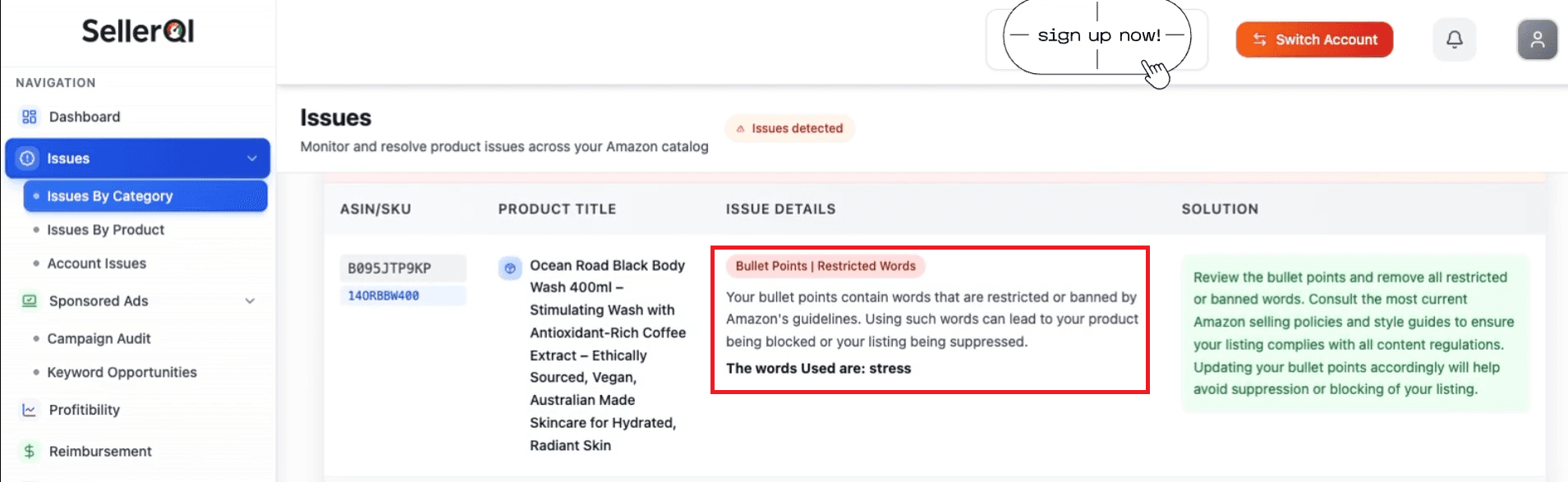
It continuously scans your product listings for issues that directly impact discoverability and conversion. The platform identifies missing keywords that competitors are ranking for and flags blocked terms that suppress your listing from search results.
It detects indexing failures where Amazon isn't recognizing your backend keywords. It also highlights image gaps or non-compliant visuals that hurt click-through rates.
Practical example:
A supplement seller noticed their best-selling protein powder dropped from page one to page three for "vegan protein powder." SellerQI's listing scanner revealed that the term "plant-based" in their bullet points triggered a restricted category flag.
While "plant-based" isn't explicitly banned, it frequently triggers silent listing suppressions because Amazon's algorithm associates it with unapproved health claims in certain supplement categories, causing the listing to be deprioritized from relevant searches.
SellerQI shows you every compliance risk and optimization gap before it costs you rankings, turning Amazon listing optimization from guesswork into precision.
#2 Stop PPC waste before it impacts your profits
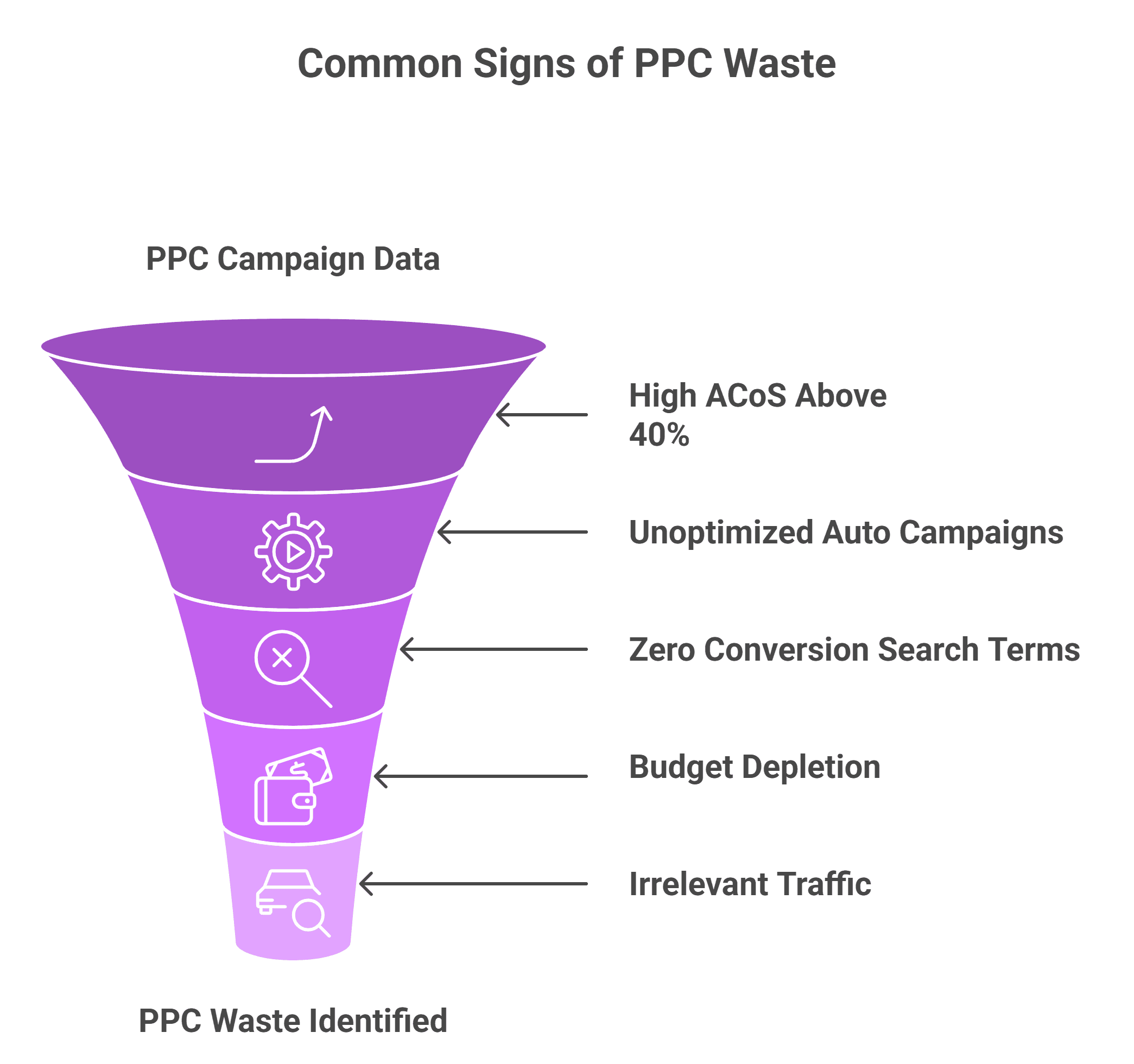
Most Amazon sellers don't realize they're bleeding money on ads until their profit margin disappears. You see clicks accumulating, assume the campaign is working, and keep the budget flowing only to discover later that half your ad spend generated zero sales.
How to know if Amazon ads are wasting money
Amazon's advertising dashboard shows impressions, clicks, and sales, but it doesn't clearly highlight which specific elements are draining your budget.
You might notice a high overall ACoS (Advertising Cost of Sale), but identifying exactly which keywords, search terms, or campaigns are responsible requires manual analysis across multiple reports, a process most sellers simply don't have time for.
How SellerQI fixes this:
SellerQI functions as a comprehensive Amazon ad waste detection system by continuously monitoring your campaigns and surfacing the exact points where money leaks. The platform highlights high-ACoS keywords that cost more than they earn.
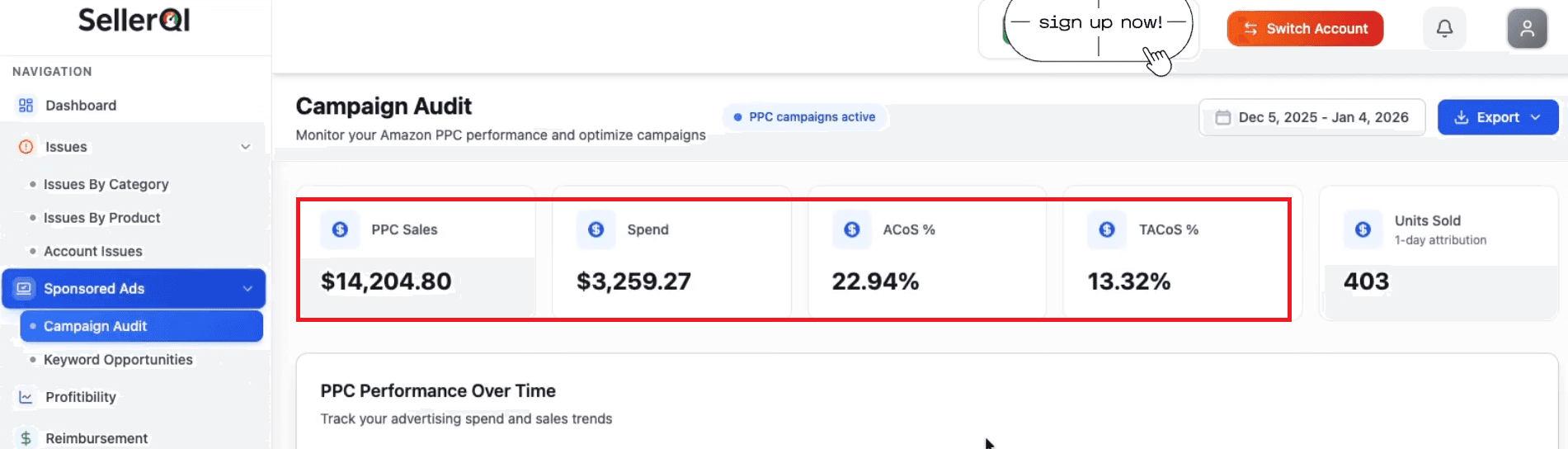
It flags wasted spend keywords draining the budget without conversions. SellerQI also shows campaigns without negative keywords and identifies auto campaign insights and inefficiencies in the background.
Practical example:
A home goods seller was spending $4,000 monthly on Sponsored Products with a 55% ACoS. Using SellerQI as a PPC audit tool, they discovered that one broad match keyword, like "kitchen organizer," was generating 300+ clicks per week.
But only two sales per month, consuming 38% of their total ad budget. After pausing that single term and reallocating spend to exact-match winning keywords, their ACoS dropped to 28% within two weeks while sales increased 15%.
SellerQI doesn't just show you campaign performance; this Amazon PPC audit tool pinpoints exactly where to cut waste and where to scale profitably.
#3 Provide high-value keywords that only convert
One of the biggest challenges for Amazon sellers is knowing which keywords actually drive sales. Many campaigns run blindly, spending the budget on terms that generate clicks but no conversions. SellerQI solves this by helping sellers discover high-converting search terms for each ASIN and integrating them directly into manual campaigns.
The hidden problem with keyword strategy:
Many sellers assume their auto campaigns are discovering the best keywords automatically. Amazon's algorithm optimizes for clicks, not profitability. A keyword might generate hundreds of impressions and dozens of clicks, but if it never converts into sales, it's actively hurting your ROI.
Even more frustrating: sellers often wonder, “How do I find high-converting keywords already in my campaigns?” Amazon's search term reports show you what shoppers searched for, but they don't clearly distinguish which terms consistently drive conversions versus which ones just waste spend.
How SellerQI fixes this:
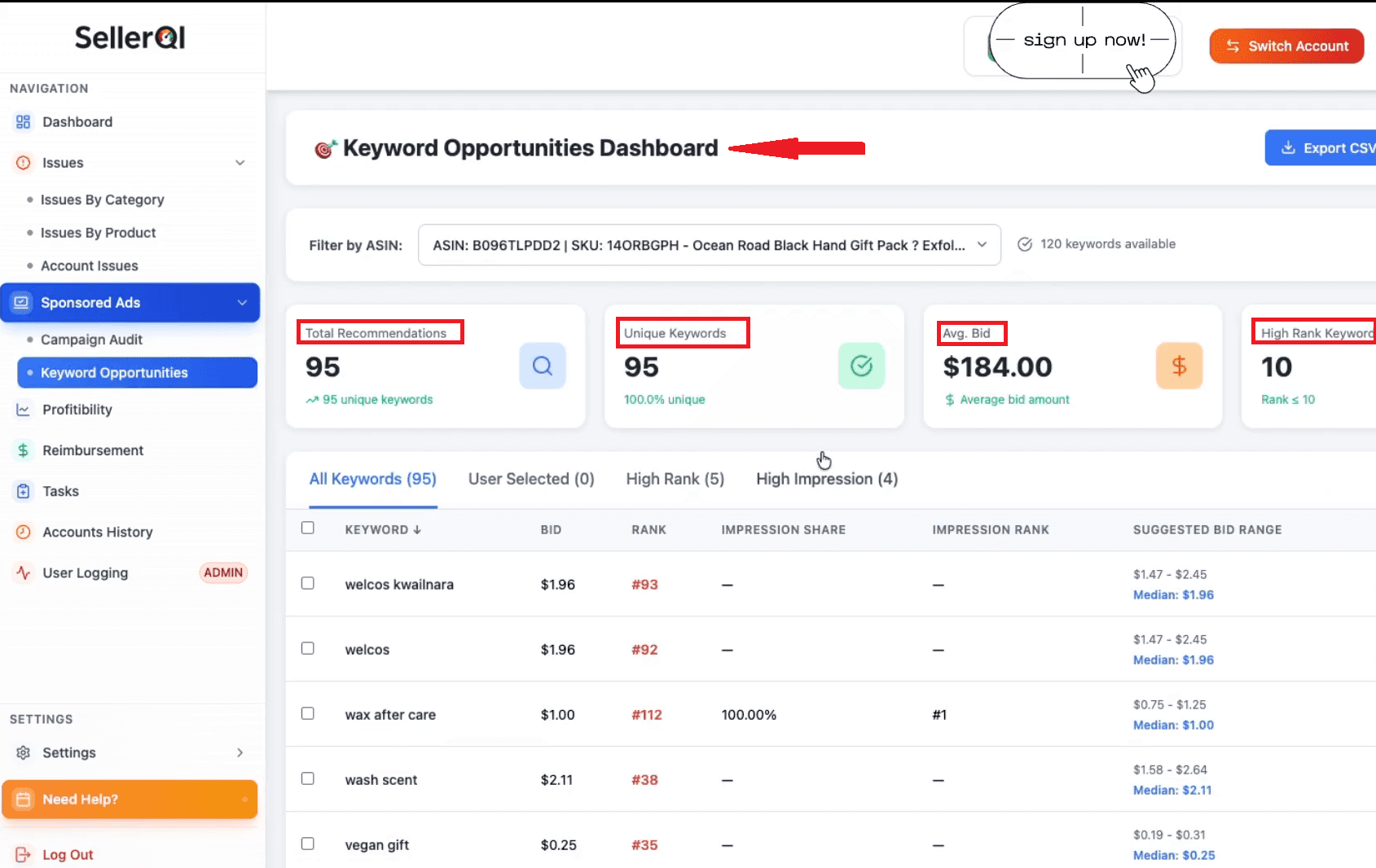
SellerQI analyzes your ASIN performance data and identifies search terms that consistently generate profitable sales, not just traffic. The keyword opportunities dashboard gives you a complete analysis of the keywords with strong conversion rates that you're either underutilizing or missing.
It allows you to add them directly into manual campaigns for better control and optimization. This approach addresses common Amazon seller performance issues where campaigns run inefficiently because they're built on assumptions rather than conversion data.
Practical example:
A fitness equipment seller was running broad campaigns for yoga mats with decent traffic but inconsistent sales. SellerQI's keyword analysis revealed that "non-slip yoga mat for hot yoga" converted at 18%, while their primary keyword, "best yoga mat," converted at only 3%.
The seller was spending 70% of their budget on the low-converting term simply because it had higher search volume. After reallocating spend to the high-converting keyword and adding related long-tail variations, their campaign ROAS improved by 240% within three weeks.
With the Amazon account health tool, you don't guess which keywords work. It shows you exactly which search terms your customers actually buy from, giving you a measurable competitive advantage.
#4 ASIN-level profit dashboard with real profitability
One of the biggest blind spots for Amazon sellers is confusing revenue with profit. A product can show strong sales, steady orders, and even good reviews, yet still lose money once ads, fees, refunds, and storage costs are factored in.
This is why many sellers struggle with how to identify unprofitable Amazon ASINs until the damage is already done. Most sellers rely on spreadsheets to calculate profitability. These sheets are time-consuming, error-prone, and quickly outdated.
As a result, decisions about scaling or cutting products are often based on assumptions rather than real numbers.
How SellerQI fixes this:
SellerQI aggregates all cost variables, such as product cost, Amazon referral fees, FBA fees, advertising spend, storage charges, and return costs, into one unified dashboard. Each ASIN displays its actual gross profit, margin percentage, and profitability trend, eliminating spreadsheet dependency.
You instantly see which products to scale (high profit, strong demand), which to fix (decent sales but margin issues), and which to discontinue (consistent losses despite optimization efforts).
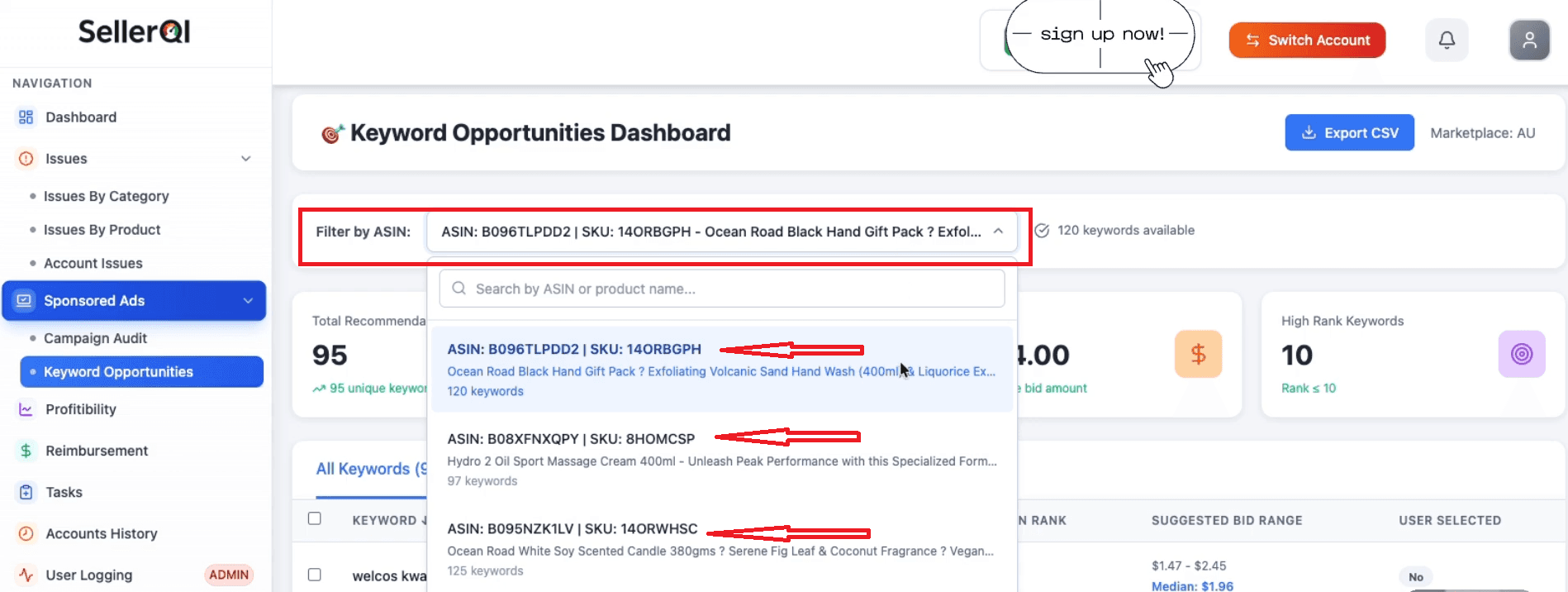
This clarity helps sellers answer three critical questions with confidence:
Which ASINs are profitable and ready to scale
Which ASINs need fixes, such as pricing, ads, or listing optimization
Which ASINs consistently lose money and should be paused or shut down
Practical example:
A beauty brand was proud of its bestselling facial serum with $22,000 in monthly revenue. SellerQI's ASIN-level profit dashboard revealed the product was generating only $340 in monthly profit, a 1.5% margin due to high return rates (18%) and expensive PPC required to maintain rankings.
Meanwhile, a lower-volume moisturizer with $8,000 in sales was producing $2,100 in profit with a 26% margin. The seller shifted their inventory investment and advertising budget toward the moisturizer, increasing overall account profitability by 47% in one quarter.
Understanding real profitability is not about sales volume. It is about visibility into what truly works, and SellerQI makes that visibility simple, accurate, and actionable.
#5 Reimbursement recovery tracker
Amazon reimbursements are one of the most overlooked areas of seller profitability. Inventory gets lost, damaged, returned incorrectly, or refunded without being sent back, and many sellers never realize money is owed to them.
The challenge is not eligibility; it is visibility. Knowing how to spot Amazon reimbursement opportunities requires tracking data most sellers never see in one place. Amazon does not automatically reimburse for every issue.
Sellers are expected to monitor shipments, returns, and adjustments, then file accurate claims within specific time windows. This is where gaps happen, especially at scale.
How SellerQI fixes this:
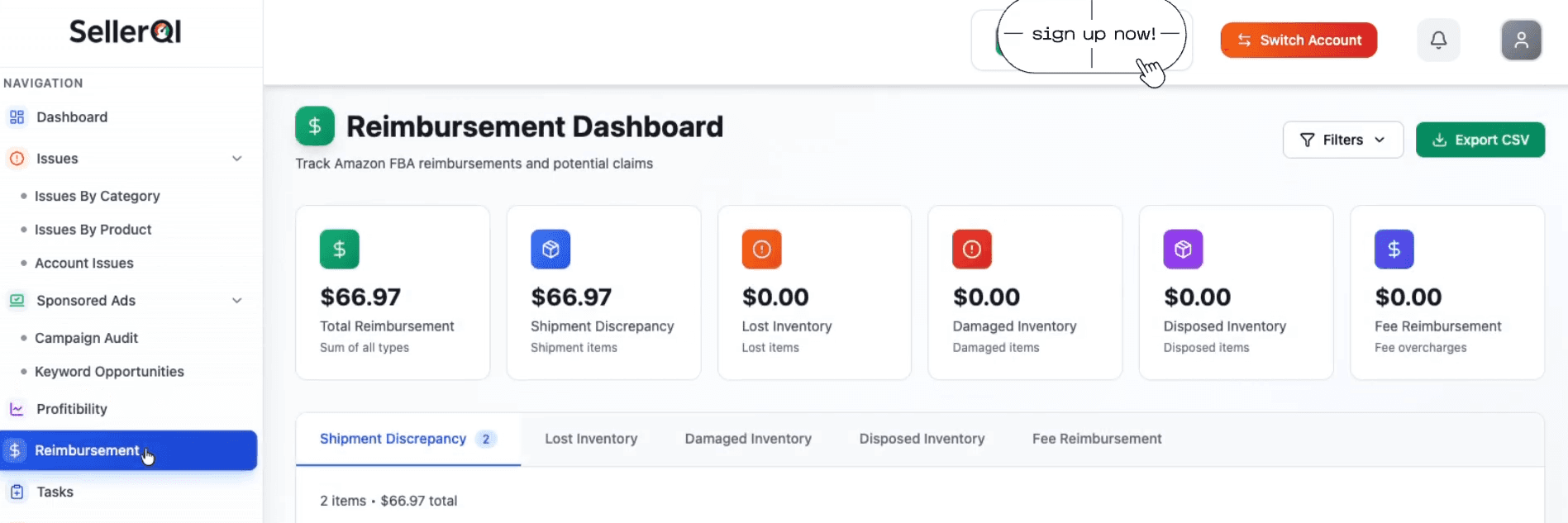
It continuously monitors inventory movement and financial records. It tracks lost, damaged, and refunded units across inbound shipments, customer returns, and warehouse events, then flags cases where Amazon may owe reimbursement.
For example, a unit may be marked as customer-refunded but never physically returned to the warehouse. Another may be lost during inbound processing and never reconciled. SellerQI highlights these situations clearly, so sellers know exactly which cases require action.
Instead of forcing sellers to compare multiple reports manually, SellerQI automates reimbursement visibility. Each opportunity is backed by matching shipment IDs, return reasons, and timestamps, which improves claim accuracy and increases approval rates.
This reduces back-and-forth with Seller Support and lowers the chance of rejected claims. Beyond recovering money, this feature adds financial transparency to Amazon account health. Sellers gain confidence that inventory discrepancies are not silently eroding profit.
Recovered funds go directly back into cash flow, improving margins without increasing sales or ad spend.
In simple terms, SellerQI turns reimbursements from a reactive, manual task into a structured recovery process.
#6 Inventory and stock monitoring
Running out of stock is one of the fastest ways Amazon sellers lose revenue, rankings, and momentum. The problem is not just stockouts; it is late awareness. Many sellers realize inventory is low only after sales slow down or ads stop delivering.
How SellerQI fixes this:
It monitors inventory levels at the ASIN level and alerts sellers early when products are trending toward low stock. These are not generic warnings. They are based on real sales velocity, lead times, and inventory movement.
For example, a product may show 300 units in stock, which looks healthy at first glance. But if daily sales suddenly increase due to ads or seasonality, that stock could run out in days. SellerQI detects this risk early and notifies the seller before the listing goes out of stock.
By providing timely, actionable alerts, SellerQI helps sellers protect:
Organic rankings that drop after stockouts
Ad performance disrupted by paused campaigns
Buy Box eligibility is affected by inventory gaps
#7 Act as an Amazon task list manager
Managing an Amazon account often feels like playing catch-up. You fix one listing issue, and another pops up. A keyword stops indexing, and a policy warning appears. The real problem is not the number of issues; it is the lack of organization.
How SellerQI fixes this:
It turns your entire account into one clear, prioritized task list. All listing issues, violations, keyword gaps, and product fixes are grouped in a single view. Each task shows what is wrong, where it appears, and what needs to be done. This makes it easier to stay compliant and in control without constantly hunting for problems.
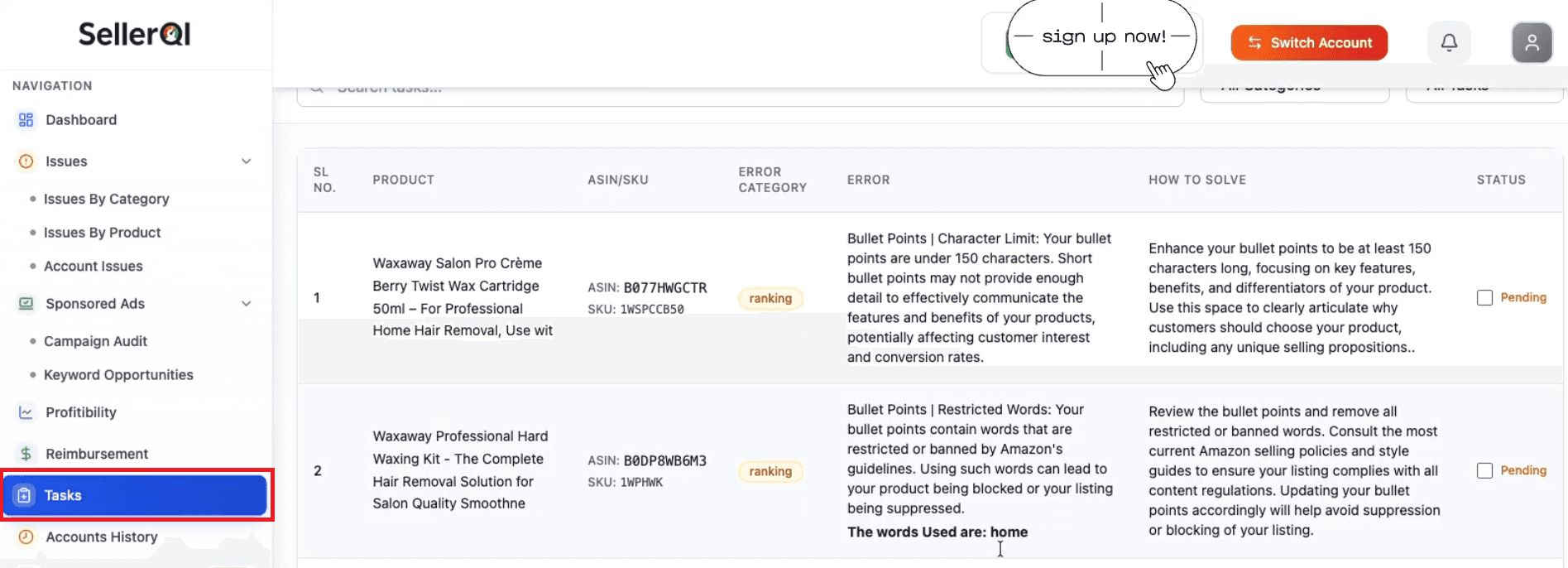
For example, a seller may have multiple ASINs affected by missing backend keywords and one ASIN flagged for a content violation. Instead of discovering these issues weeks apart, SellerQI lists them together, allowing the seller to fix everything in one focused workflow.
By converting ongoing account signals into actionable tasks, SellerQI helps sellers move from reactive firefighting to proactive account management. Problems are addressed earlier, compliance risks are reduced, and listings stay optimized consistently. It organizes them into clear actions, so sellers know exactly what to do next and why it matters.
Who should use SellerQI?
Established sellers with growing catalogs
Brands managing multiple ASINs
Sellers are scaling ads aggressively
Amazon agencies managing multiple accounts
The bottom line
Selling on Amazon shouldn’t feel like guessing where your money went. When you can clearly see what’s breaking, leaking, or holding growth back, better decisions come naturally. With a 24/7 Amazon account watch, SellerQI brings that clarity by turning hidden account issues into simple, actionable insights.
If you’re serious about protecting profits and scaling with confidence, start by understanding your account better. Sometimes, one clear view is all it takes to change everything.