TL;DR
Amazon PPC waste usually comes from keywords that keep generating clicks but never convert, high ACoS campaigns, and campaigns running without negative keywords, all of which slowly drain the ad budget.
The fastest way to identify wasted spend is to find keywords with significant spend and zero sales, then pause them, lower bids, or add them as negative keywords to prevent further budget loss.
High ACoS campaigns should be analyzed at the campaign and keyword level; reducing bids, removing irrelevant search terms, and restructuring poorly performing campaigns can help bring ACoS below the break-even point.
Irrelevant clicks often occur when campaigns run without negative keywords, allowing Amazon to match ads to loosely related search queries that are unlikely to convert.
Search term data from auto campaigns can reveal profitable keywords; moving these converting terms into manual exact match campaigns helps control bids and scale profitable traffic.
A structured PPC audit using tools like SellerQI helps sellers quickly identify wasted spend keywords, high ACoS campaigns, missing negative keywords, and profitable search terms, making optimization faster and more consistent.
Running Amazon ads without seeing the expected returns is one of the most frustrating challenges for sellers. The budget keeps going out, but the sales do not always follow. Amazon PPC waste is more common than most sellers realize.
It builds quietly through high ACoS keywords that never convert and ad groups that have no protection against irrelevant traffic.
This guide breaks down the most common sources of wasted ad spend, how to identify them, and how to fix them with an AI-driven operation intelligence platform like SellerQI.
Why is my Amazon PPC spending so much with no sales?
This is one of the most frequently asked questions among Amazon sellers, and the answer is almost always the same. The unprofitable PPC campaigns are generating clicks, but those clicks are not converting into purchases. There are several reasons this happens:
Broad or automatic targeting is matching your ads to searches that are loosely related to your product but not relevant enough to drive a purchase.
Bids are set too high for keywords with low purchase intent, meaning you are paying a premium to reach shoppers who are unlikely to buy.
Campaigns are running without negative keywords, which means there is no filter in place to block irrelevant searches from triggering your ads.
High ACoS campaigns are going undetected, quietly spending above your break-even point without being flagged.
It is worth noting that Amazon's advertising platform is designed to spend your budget efficiently, not to protect it. Monitoring and optimization are the seller's responsibility, and without the right tools, that becomes a significant time commitment.
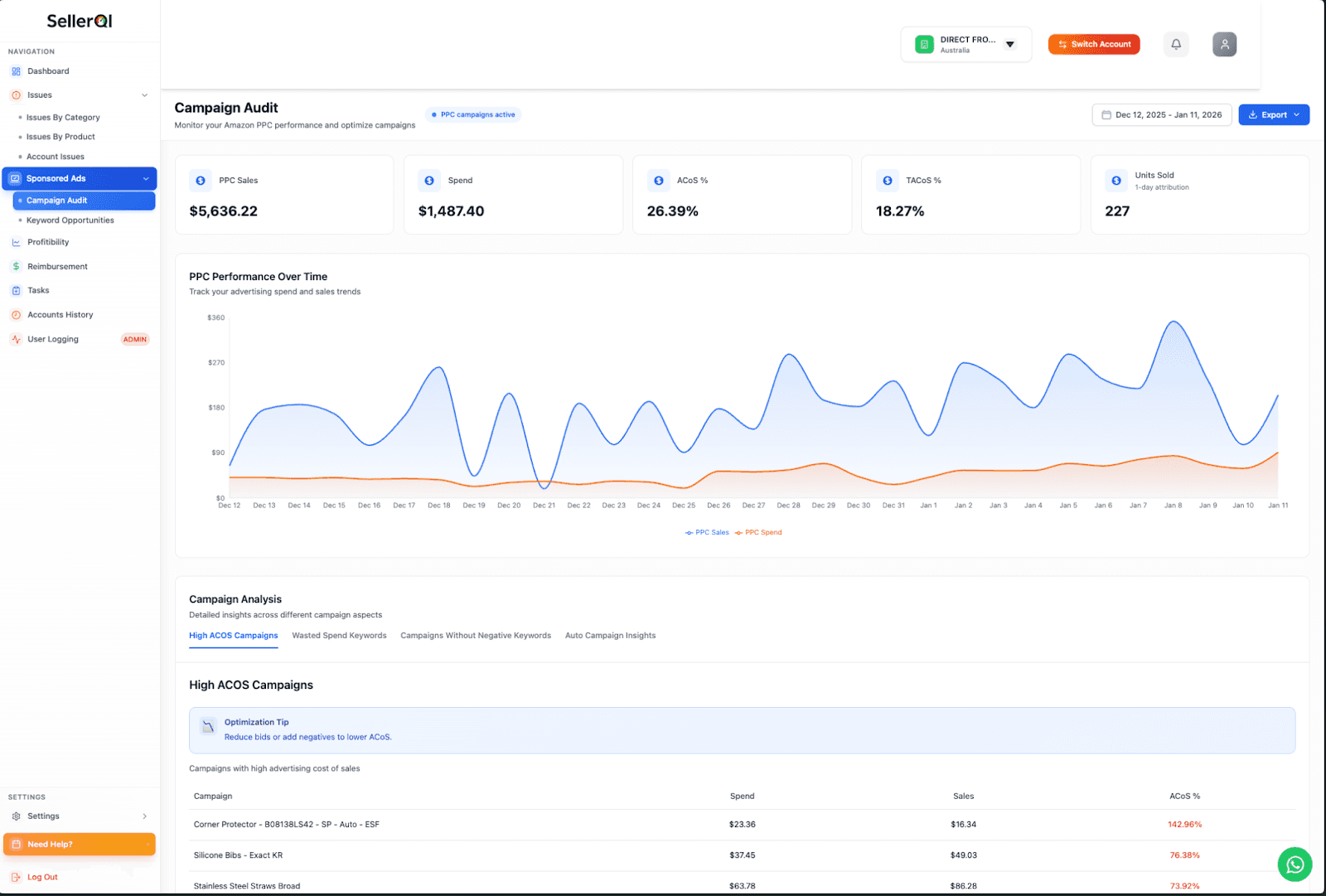
In this place, SellerQI, an Amazon seller analytics toolgives a campaign Audit dashboard that provides an immediate overview of how your PPC budget is being used. Total PPC Sales, Spend, ACoS%, TACoS%, and Units Sold are all visible in one place, giving sellers a clear starting point for identifying where things are going wrong.
How do I find wasted spend in Amazon PPC?
Identifying wasted PPC spend on Amazon manually requires pulling search term reports, filtering by spend, checking for conversions, and repeating this process across every active campaign. It is time-consuming, and by the time the analysis is complete, the waste has continued for another few days.
The most direct way to find wasted spend is to look for keywords with significant spend but zero sales. These are clicks you have paid for that generated no revenue whatsoever. This can be understood with a practical example.
The keywords such as "silicone bib," "metal straw," and "microneedling derma roller" were each showing $0.00 in sales while continuing to accumulate spend. In one account audit, there were 480 wasted spend keywords identified across 48 pages, all of them actively drawing from the advertising budget with nothing to show for it.
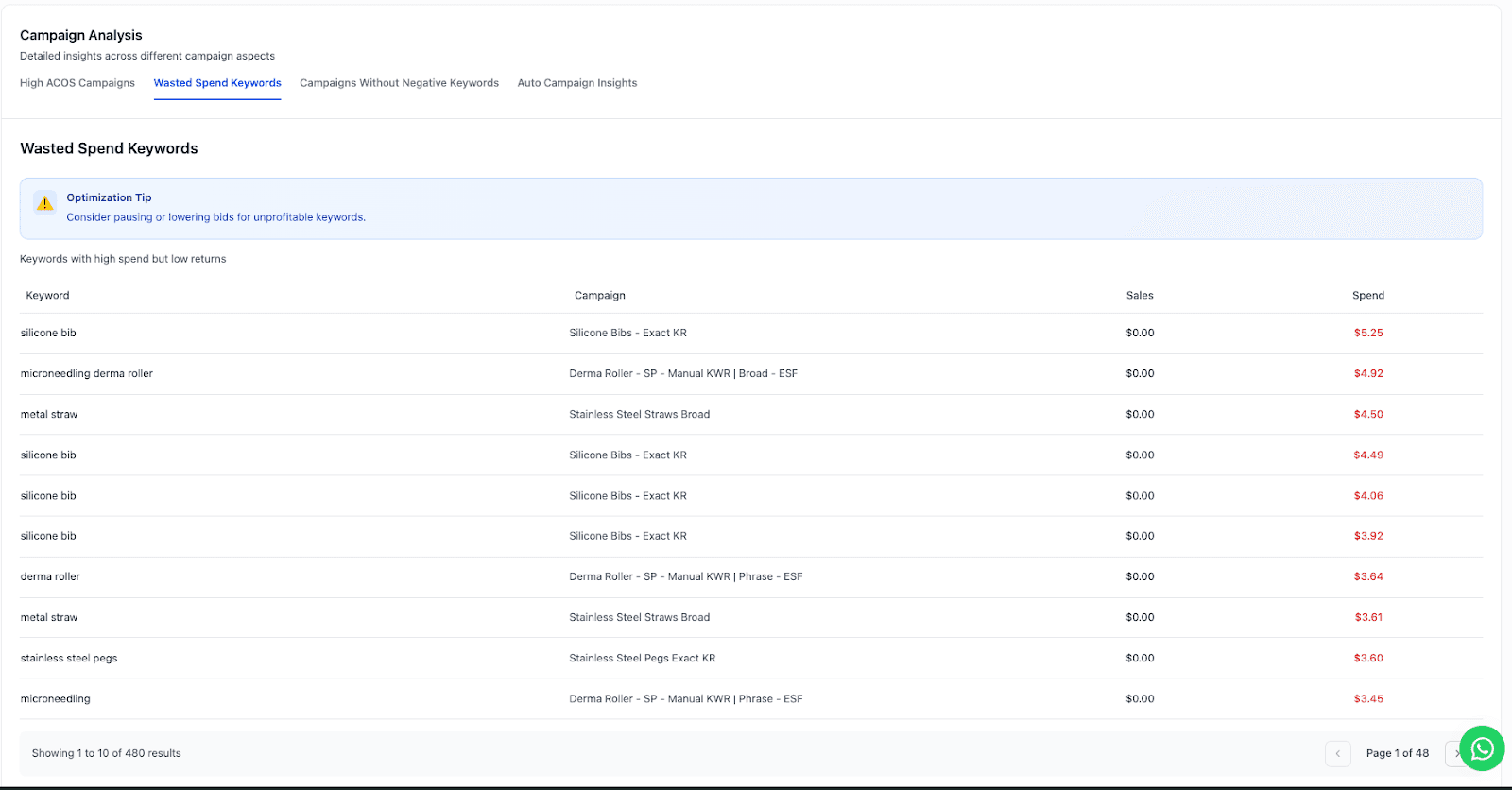
SellerQI's wasted spend keywords tab identifies all of these automatically. Every keyword with high spend and no returns is listed clearly, sorted so that the most costly offenders appear first. Sellers can act on this information immediately; no manual reporting required.
SellerQI also gives actionable insights such as the following:
PPC keywords to pause that have accumulated 10 to 15 clicks with zero conversions.
Add paused keywords to your negative keyword list to prevent future spend.
For keywords with occasional historical conversions that are currently underperforming, consider lowering the bid before pausing entirely.
How do I lower my ACoS on Amazon?
ACoS, or Advertising Cost of Sale, represents the percentage of revenue that is being spent on advertising. Reducing it is one of the clearest ways to improve the profitability of your campaigns. The objective is not to eliminate ad spend entirely, but to ensure that the ACoS for each campaign stays below your break-even margin.
The most effective starting point is to identify which individual campaigns are running significantly above your target, not just the account average. A healthy overall ACoS can cover individual campaigns that are deeply unprofitable.
Practical example:
A campaign for a corner protector product was running at an ACoS of 142.96%. For every $100 in sales generated, $142 was being spent on advertising. Several other campaigns in the same account were running at 70%+ ACoS. Left unchecked, these campaigns will continue to erode margins regardless of how well other campaigns perform.
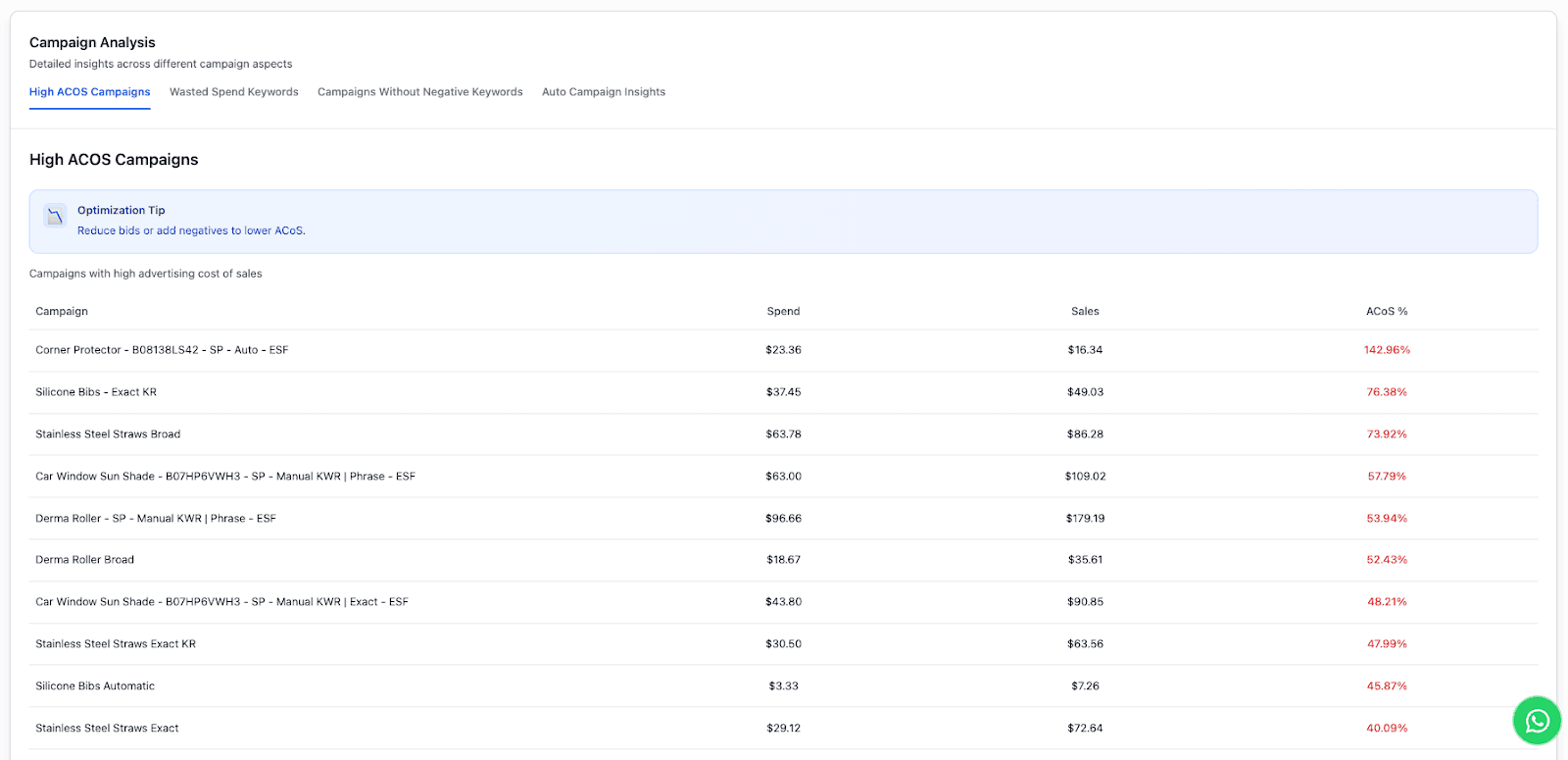
SellerQI's high ACoS campaigns feature flags for every campaign that is running above a profitable threshold. The table displays campaign name, total spend, sales generated, and ACoS% side by side, along with a built-in optimization tip like reducing bids or adding negatives to lower ACoS.
Steps to bring ACoS down:
Reduce bids on the specific high-ACoS keywords within the flagged campaigns; cutting the overall budget alone will not fix the underlying issue.
Add non-converting search terms as negative keywords to improve campaign relevance.
For campaigns that have consistently exceeded your target ACoS for 30 or more days, consider pausing and restructuring with tighter keyword targeting.
How do I stop irrelevant clicks on Amazon ads?
Irrelevant clicks occur when Amazon displays your ad in response to a search query that does not closely match your product. A shopper sees the ad, clicks out of curiosity, and leaves without purchasing. The seller pays for that click regardless.
The primary cause of irrelevant clicks is running campaigns without negative keywords. Without them, Amazon's algorithm has broad latitude to match your ads to any query it considers relevant, and that definition can be surprisingly wide.
For example, a seller listing stainless steel straws with no negative keywords configured may find their ads appearing for searches like "plastic straws," "reusable bags," or "eco-friendly kitchen products." Each of those clicks costs money and is unlikely to convert.
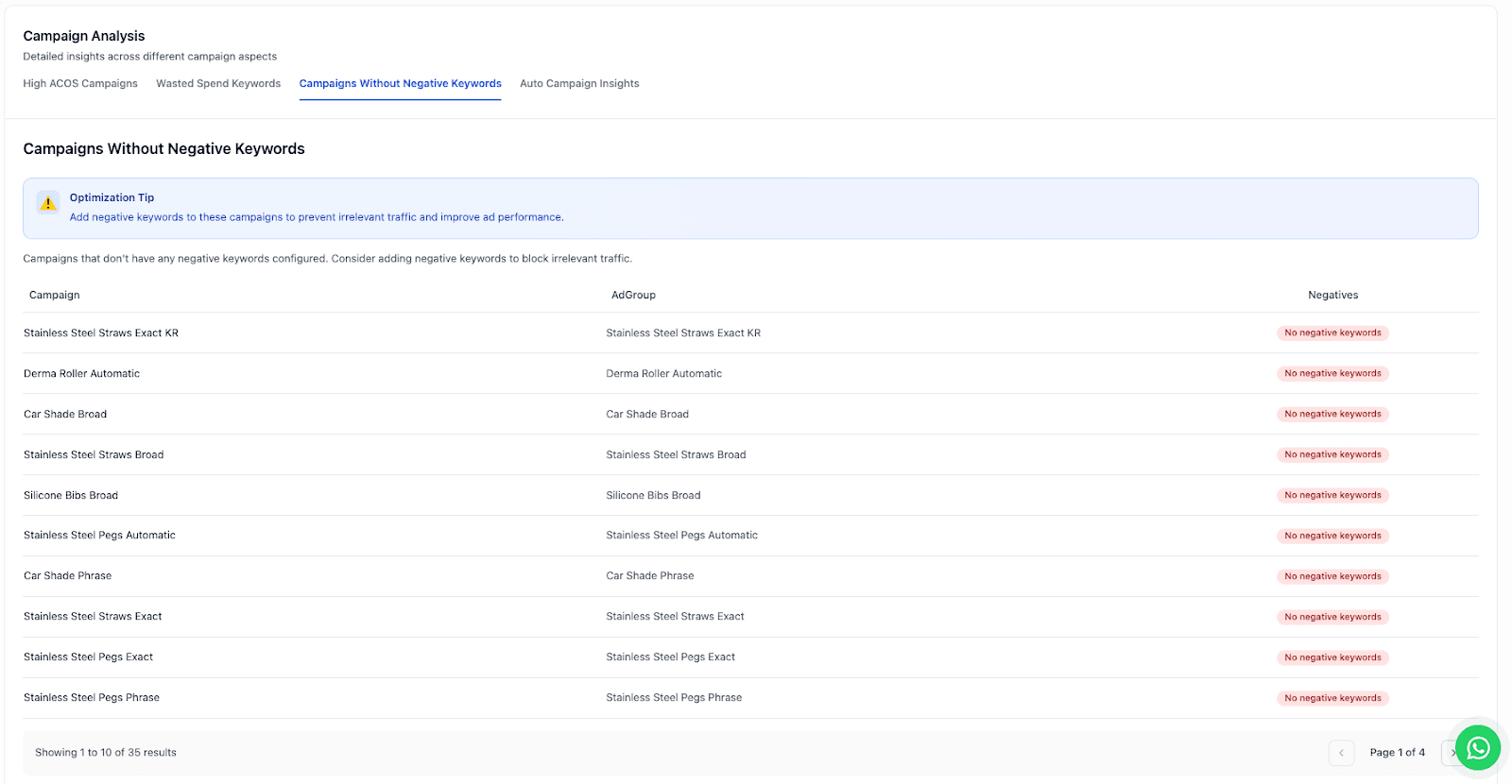
SellerQI's campaigns without the negative keywords tab identify every campaign that has no negative keywords in place. In the account shown above, 35 campaigns across 4 pages had this gap. Each of those campaigns was fully exposed to irrelevant traffic with no filter to reduce it.
How to address this:
Review your search term reports regularly and identify queries that triggered impressions but are unrelated to your product.
Add clearly irrelevant terms as exact or phrase-match negatives.
As a starting point, consider adding competitor brand names, unrelated product categories, and low-intent search terms.
Treat negative keyword management as an ongoing process, not a one-time fix.
How do I know if my Amazon PPC campaign is profitable?
Determining whether a campaign is truly profitable requires more than looking at sales numbers. Amazon PPC waste requires understanding the relationship between your advertising spend and your product margins. A useful benchmark is your break-even ACoS, which corresponds to your profit margin percentage.
If your net margin on a product is 30%, any campaign running above 30% ACoS is costing more to run than it returns. This is straightforward in theory, but difficult to monitor across multiple campaigns without a systematic approach.
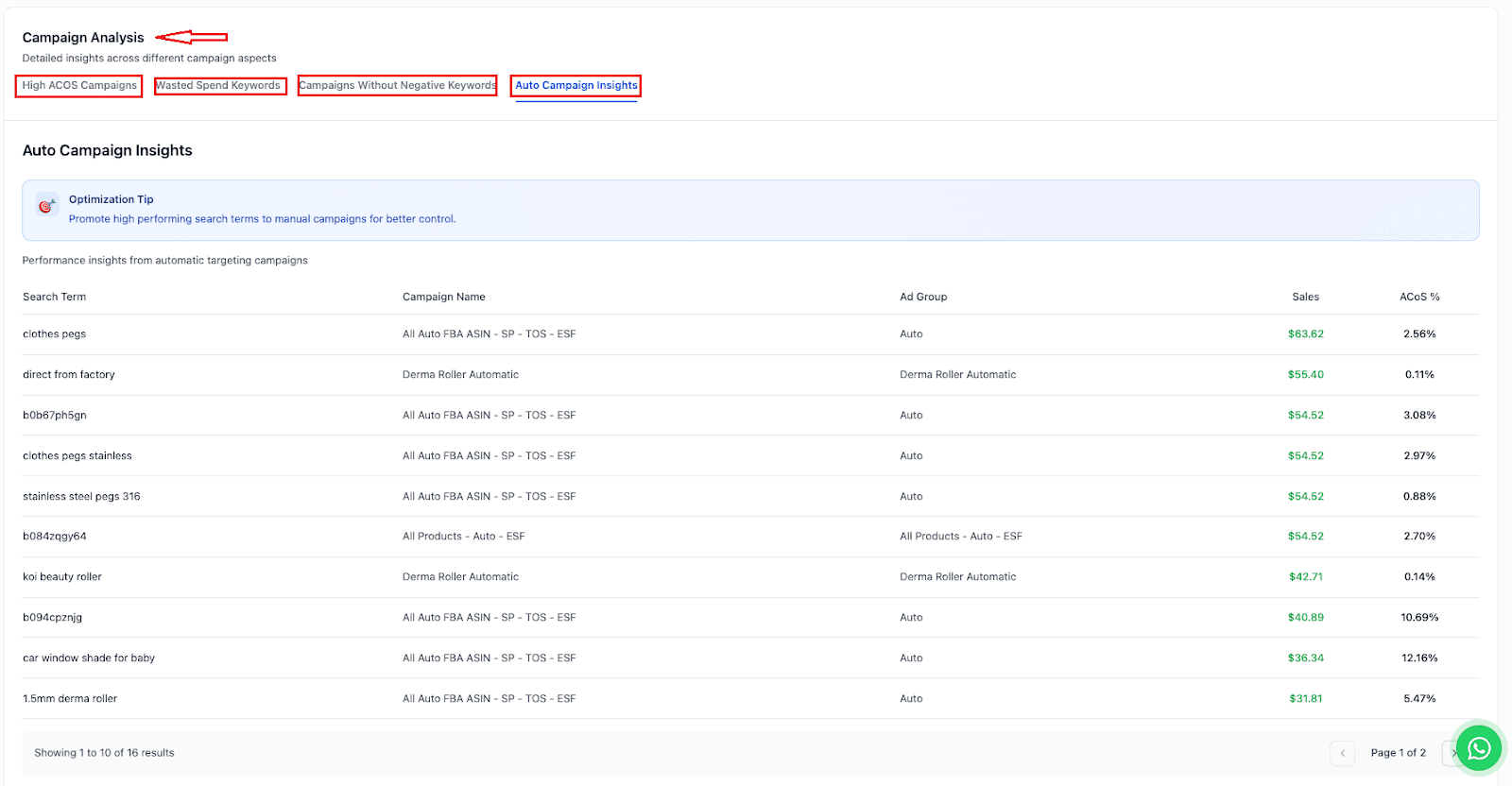
Beyond cutting waste, profitability also depends on identifying which keywords and search terms are genuinely working and scaling them appropriately. Automatic campaigns are particularly useful for this purpose, as they continuously discover search terms that sellers may not have considered targeting manually.
When a search term from an auto campaign begins converting consistently at a low ACoS, it is a strong indicator that it should be promoted to a manual campaign where bids, match types, and budgets can be controlled more precisely.
Recommended approach:
Identify search terms from auto campaigns that are converting consistently below your target ACoS
Add these to a manual exact match campaign to gain full control over bidding and budget
Negative the same terms in your auto campaign to avoid competing against your own manual campaign
Increase bids with confidence, as conversion data from the auto campaign already provides proof of performance
Taken together, SellerQI's four campaign analysis tabs, such as High ACoS campaigns, wasted spend keywords, campaigns without negative keywords, and auto campaign insights, give sellers a complete and structured view of where money is being lost and where profitable opportunities are being missed.
Wrap up
Amazon PPC waste is the result of incomplete visibility. High ACoS campaigns are easy to overlook when they blend into an acceptable account average. Keywords with no conversions keep spending because no one has had the time to find them.
The solution is straightforward. Audit your campaigns regularly, pause what is not working, protect your ad groups with negative keywords, and scale the search terms that are proven to convert.
SellerQI's campaign audit brings all of this into a single dashboard, so sellers can make informed decisions, reduce Amazon advertising waste quickly rather than spending hours in Seller Central.
Start your free account scan and complete your first campaign audit today.
FAQs
What keywords should I avoid in Amazon PPC?
Avoid broad match keywords that trigger unrelated searches, generic high-volume keywords with low buying intent, and terms that conflict with your product positioning. Avoid competitor brand names. These keywords often generate clicks without conversions, increase ACoS, and waste ad budgets.
What are negative keywords in Amazon PPC?
Search terms you block so your ads do not appear for irrelevant queries. Negative keywords reduce wasted spend by filtering unqualified traffic before it clicks on your ad.
What is a good ACoS for Amazon PPC?
A good ACoS is equal to or lower than your product’s net profit margin. If your profit margin is 35%, your target ACoS should be 35% or below to stay profitable. ACoS should decrease over time while maintaining sales volume.
What is keyword cannibalization in Amazon PPC?
It happens when multiple campaigns bid on the same keyword, causing your own ads to compete against each other. This increases CPC, splits the budget inefficiently, and raises ACoS without increasing total sales. It commonly occurs when the same keyword exists in both automatic and manual campaigns.