TL;DR
Stockouts don't just pause your listing; they trigger ranking drops, Buy Box loss, and a slow recovery that can take weeks or months.
Amazon's algorithm treats zero inventory as a reliability signal and reallocates your visibility to competitors immediately.
Static reorder points fail, and your alerts need to factor in sales velocity, lead time, and buffer stock together.
Automated inventory monitoring catches stock issues 24/7, so you're not dependent on manual Seller Central checks.
SellerQI gives you real-time, ASIN-level inventory alerts connected to profitability, FBA fees, and conversion, all in one dashboard.
The right inventory alert system stops you from reacting to stockouts and puts you in a position to prevent them entirely.
Most Amazon sellers think a stockout is just a few days of lost sales. But it's not. It's a ranking drop, a Buy Box problem, and a recovery battle that can take weeks, and sometimes months. The real damage happens after you restock, not during.
That's exactly why Amazon inventory alerts are no longer optional for serious sellers. If you want to prevent Amazon out-of-stock situations before they quietly destroy everything you've built, you need to know what's happening in your inventory before Amazon tells you it's already too late.
In this guide, we’ll break down exactly what happens when you run out of stock, how it affects your listing and Buy Box performance, and how Amazon seller analyticssuch as SellerQI, can help you avoid stockouts entirely.
What happens to my Amazon listing when I run out of stock?
The moment your inventory hits zero, Amazon's algorithm doesn't just pause your listing; it starts penalizing it. Your sales velocity drops to zero instantly. And since sales velocity is one of the strongest ranking signals in Amazon's A10 algorithmyour keyword rankings begin to fall. Products that were showing on page one start slipping to page two, three, or further.
Across 240 sellers, Amazon stockouts resulted in an average of $18,000 in lost revenue due to ranking drops, missed Buy Box time, and slow recovery velocity. That's not just the sales you missed while you were out of stock; that's the long tail of ranking recovery, and ad spend required to claw your way back.
When inventory hits zero, Amazon's algorithm reallocates visibility to competitors with consistent availability, and that shift doesn't instantly reverse when inventory returns. Keyword reindexing can take days or weeks, especially for competitive search terms.
A history of stockouts not only hurts you during the stockout prevention, but also damages your algorithmic standing afterward, as the system flags your account as an unreliable supply source.
How to prevent stockouts on Amazon FBA?
Set dynamic reorder points, not static ones: Most sellers set a fixed number, "alert me when I hit 50 units", and call it a day. But that number means nothing if your sales velocity doubles during a peak season. Your reorder point needs to account for lead time, current sales rate, and buffer stock together.
Don't rely on manual checks: Manually logging into Seller Central to check stock levels is how sellers miss things. You're busy. You forget. Things change overnight. Automated inventory monitoring exists specifically to solve this; it watches your numbers 24/7 so you don't have to.
Use third-party tools for Amazon inventory tracking: Amazon's native Seller Central tools are a starting point, but they weren't built with proactive alerting in mind. The best third-party tools for Amazon inventory tracking software, like SellerQI, go further. They monitor your stock in real time, factor in your actual sales velocity, and send you automated inventory notifications before you reach a critical level, not after.
How does SellerQI help with this?
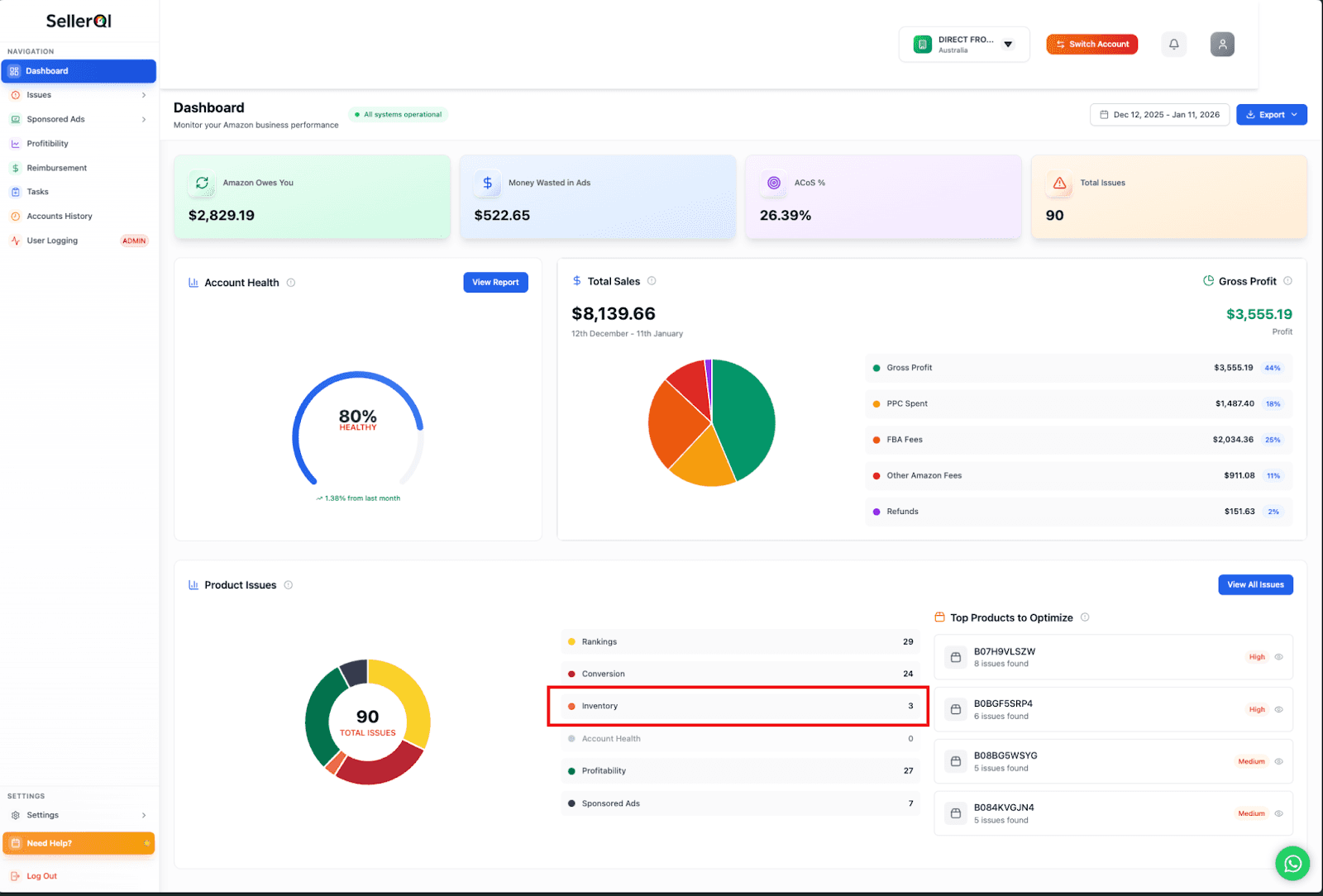
Looking at the SellerQI dashboard, the Inventory section shows you the full picture of what's going on across your ASINs. You can see exactly which products are flagged as inventory issues, tracked right alongside your rankings, conversion, account health, and profitability in one clean view. Here's what SellerQI's real-time Amazon stock alerts actually do for you:
#1 Low stock warning on Amazon
SellerQI tracks your stock levels continuously and sends you a low stock warning on Amazon. Sellers actually need one that gives you enough lead time to act, not just a notification that you're already out. You set the threshold, and SellerQI watches it around the clock.
#2 Automated inventory notifications
You don't need to be inside the dashboard to know something is wrong. SellerQI's automated inventory notifications flag inventory issues as prioritized tasks. So when you log in, you know exactly what needs attention first.
#3 ASIN-level visibility across your entire catalogue
One of the biggest problems with inventory management at scale is that issues hide in your catalogue. A slow-moving ASIN you haven't checked in a week might be about to run out. SellerQI surfaces these issues automatically, showing you which ASINs have inventory problems flagged as high priority.
#4 Inventory data connected to profitability
SellerQI shows you the profitability impact at the ASIN level. You can see your FBA fees, gross profit, and total sales alongside your inventory health, so your restocking decisions are actually based on margin, not just unit count. With SellerQI, sellers can spend less time firefighting and more time growing, because Amazon inventory alerts are working in the background while you focus on everything else.
Final words
Stockouts are one of the most expensive mistakes an Amazon seller can make and the frustrating part is that most of them are completely avoidable. The ranking drops, the Buy Box losses, the weeks of recovery and spending none of that needs to happen if you have the right Amazon inventory alerts in place.
If you're serious about finding the best online inventory monitoring solution built specifically for Amazon sellers, SellerQI gives you real-time visibility, automated alerts, and ASIN-level insight all in one place. Stop reacting to stockouts. Start preventing them.
FAQs
How do stockouts affect the Amazon Buy Box?
Going out of stock immediately removes you from Buy Box eligibility. Amazon tracks your reliability over 30, 90, and 365-day windows, so one stockout can cost you Buy Box share for months after you've restocked.
What is the Amazon Inventory Performance Index, and why does it matter?
The IPI is Amazon's score for how efficiently you manage your FBA inventory. Drop below 400, and Amazon limits your storage capacity and makes it even harder to stay in stock.
Can I sell on Amazon FBM while my FBA inventory is out of stock?
Yes. Activating an FBM listing for the same ASIN keeps your listing live and sales velocity moving while FBA stock is being replenished. It won't match FBA performance, but it significantly reduces the ranking damage.
How to get low stock alerts on Amazon?
Amazon's native Restock tool offers basic alerts, but they're limited and static. Tools like SellerQI send real-time, velocity-based low stock warnings so you can act before you actually run out.