TL;DR
Amazon often owes FBA sellers money due to lost inventory, damaged items, return issues, and fee errors.
Sellers lose around 1-3% of revenue each year in unclaimed FBA reimbursements or FBA refunds.
Amazon does not automatically reimburse all errors; sellers must find issues and file claims within strict deadlines.
Since 2025, many reimbursements have been based on product cost, not selling price, which can lower payouts.
Manual reimbursement tracking is time-consuming and easy to get wrong due to scattered reports and missed deadlines.
Automated tools like SellerQI scan all reimbursement categories, identify missed claims, and help recover money faster.
Selling on Amazon through Fulfillment by Amazon (FBA) comes with a hidden cost most sellers never notice: Amazon probably owes you money right now. Every day, thousands of FBA sellers lose money to inventory discrepancies, damaged products, incorrect fees, and customer return errors.
In fact, studies show that Amazon sellers lose an average of 1 to 3% of their revenue to reimbursable issues that go unclaimed.
But what if recovering those lost funds was easier than you think?
This guide will walk you through everything you need to know about FBA reimbursement, from identifying what you're owed to filing Amazon reimbursement claims successfully.
What is FBA reimbursement?
FBA reimbursement is the money Amazon pays back to sellers when something goes wrong with their inventory or fulfillment process. When you use FBA, Amazon takes responsibility for storing, packing, and shipping your products. But mistakes happen, like items getting lost, damaged, or mishandled, and when they do, Amazon is required to compensate you.
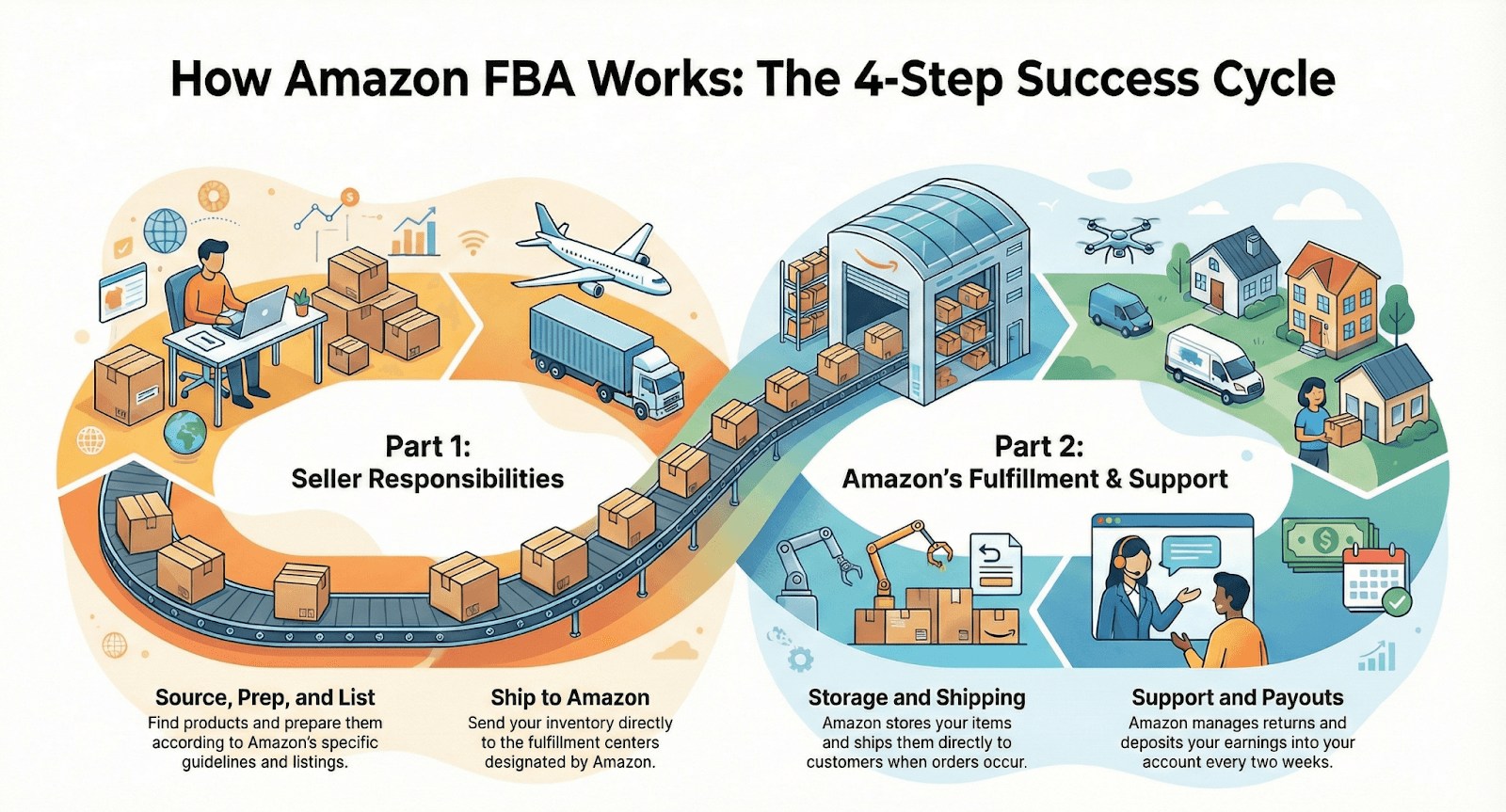
How Amazon FBA works:
Common scenarios that qualify for reimbursement include:
Lost or damaged inventory in Amazon's fulfillment centers
Items lost during inbound shipment to Amazon warehouses
Customer returns that are never returned to inventory
Inventory damaged by Amazon warehouse staff
Incorrect FBA fees were charged to your account
Products destroyed without your authorization
Removal order errors where inventory goes missing
The challenge is that Amazon doesn't automatically reimburse you for these errors. You need to identify the issues yourself and file claims to recover your money.
Why do most sellers miss reimbursements?
Missing reimbursements doesn't mean you're not paying attention. It is mainly due to the:
Information is scattered everywhere: Your data isn't in one place. You have to check multiple reports, different portals, and past support cases just to piece together what's happening.
Deadlines sneak up on you: Amazon gives you limited time to file claims, and they don't send friendly reminders when those deadlines are approaching.
Tracking inventory takes forever: Following your products as they move through Amazon's system and matching everything up is incredibly time-consuming.
You're focused on growing your business: You are managing ads, restocking inventory, creating new listings, and launching products. Chasing Amazon FBA reimbursements isn’t why you started selling.
Why Amazon reimbursement claims matter
The financial impact of unclaimed reimbursements adds up quickly. Let's understand this with an example. If you sell $50,000 per month through FBA and lose just 2% to reimbursable errors; that's $1,000 per month or $12,000 per year, leaving your pocket.
Here's what makes this situation frustrating.
Amazon's massive fulfillment operation handles millions of products daily. With such volume, errors are inevitable. However, the burden of catching these mistakes falls entirely on you, the seller. Amazon won't proactively notify you about lost inventory or fee errors; you must discover and claim them yourself.
Additionally, Amazon enforces strict time limits on Amazon reimbursement claims. Most issues must be reported within 18 months of occurrence, though some windows are even shorter. Miss the deadline, and that money is gone forever.
Types of FBA reimbursements you can claim in 2026
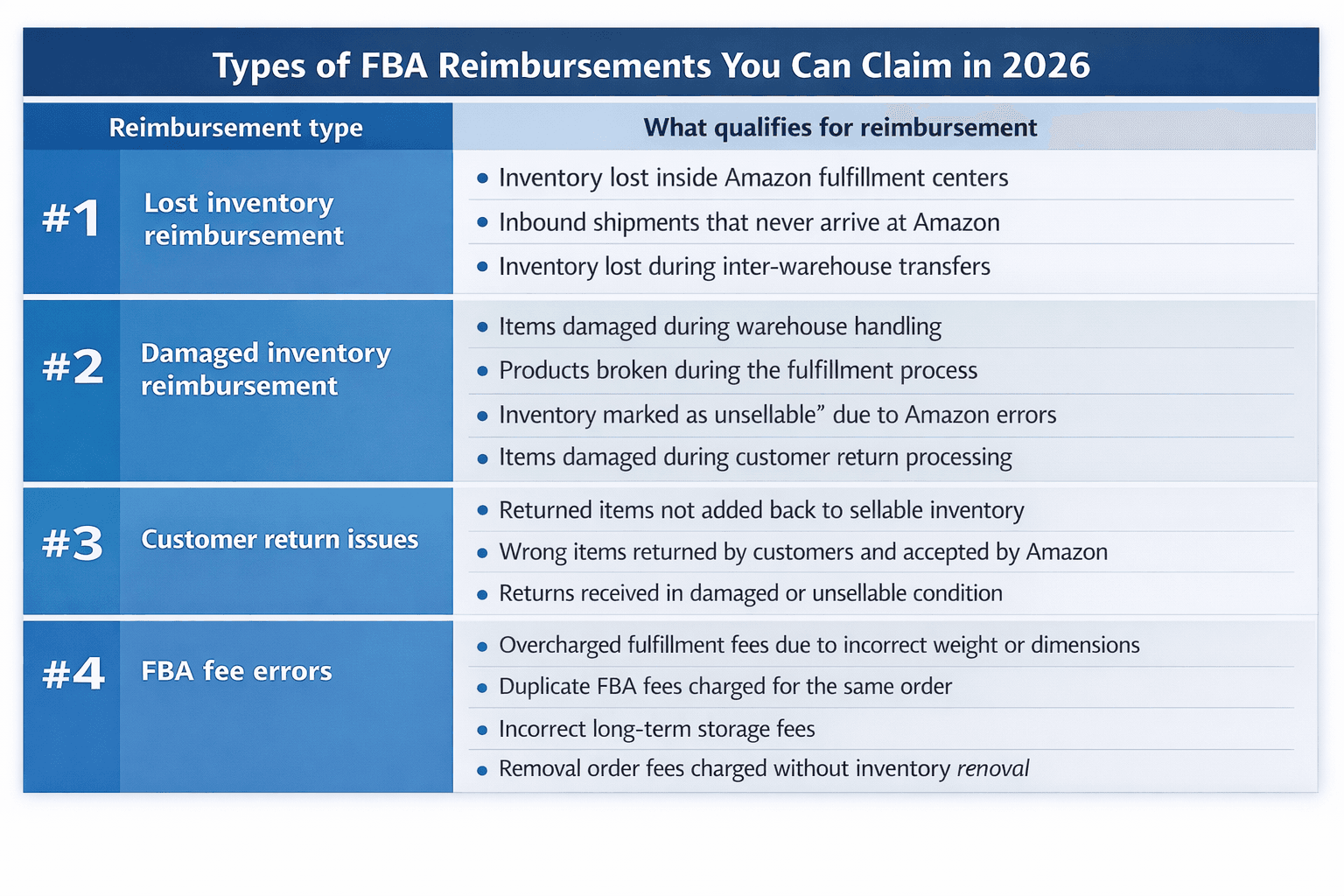
Understanding what qualifies for reimbursement is the first step in recovering your money. Here are the main categories:
#1 Lost inventory reimbursement
Amazon lost inventory reimbursement covers items that go missing within Amazon's fulfillment network. This includes:
Warehouse lost inventory: Products that disappear from Amazon's warehouses without explanation.
Lost inbound shipments: Items that never arrive at Amazon's fulfillment centers.
Inter-warehouse transfer losses: Products lost while being moved between Amazon facilities.
Amazon's automated reimbursement system resolves some inventory discrepancies automatically. However, the system does not catch all issues. Without systematic tracking and monitoring, sellers have no way to verify whether eligible reimbursements have been processed or overlooked.
#2 Damaged inventory reimbursement
Amazon assumes liability for products damaged during storage or fulfillment while under its operational control.
Items damaged during warehouse handling
Products broken during the fulfillment process
Inventory marked as "unsellable" due to Amazon's error
Damaged items during customer returns processing
#3 Customer return issues
Returns create multiple reimbursement opportunities, like:
Returned items not added back to inventory: Customer returns that Amazon receives but fails to return to your sellable stock.
Wrong items returned: Customers return different products than what they ordered, but Amazon accepts the return.
Significantly damaged returns: Items returned in unsellable condition that should have been rejected.
#4 FBA fee errors
Fee errors happen when Amazon has incorrect dimensions/weight categories, and you get charged too much. The FBA fee reimbursement process helps you recover money from incorrect charges, such as:
Overcharged fulfillment fees due to incorrect weight or dimensions
Duplicate FBA fees were charged for the same order
Long-term storage fees were charged incorrectly
Removal order fees when the inventory wasn't actually removed
Fee errors might seem small individually, maybe $2 to 5 per transaction, but they compound dramatically across hundreds or thousands of orders.
How to find Amazon FBA reimbursements in Seller Central?
Finding your reimbursements is straightforward once you know where to look. Log into Seller Central and navigate to Reports > Fulfillment.
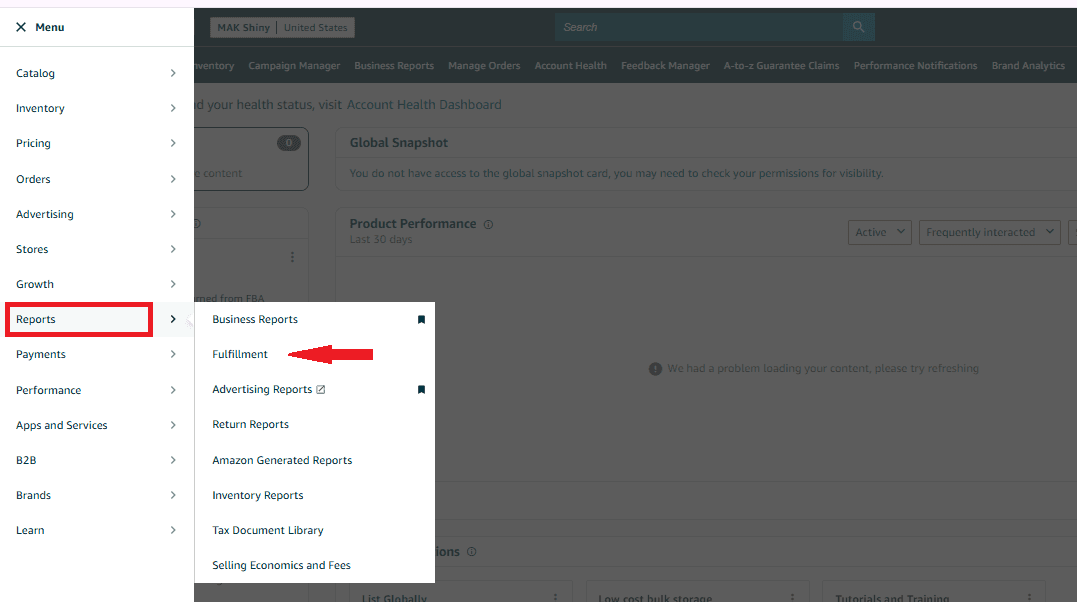
Image Alt Text: Amazon FBA reimbursements in Seller Central
Click on Reimbursements to see a complete list of all reimbursements Amazon has already issued you.
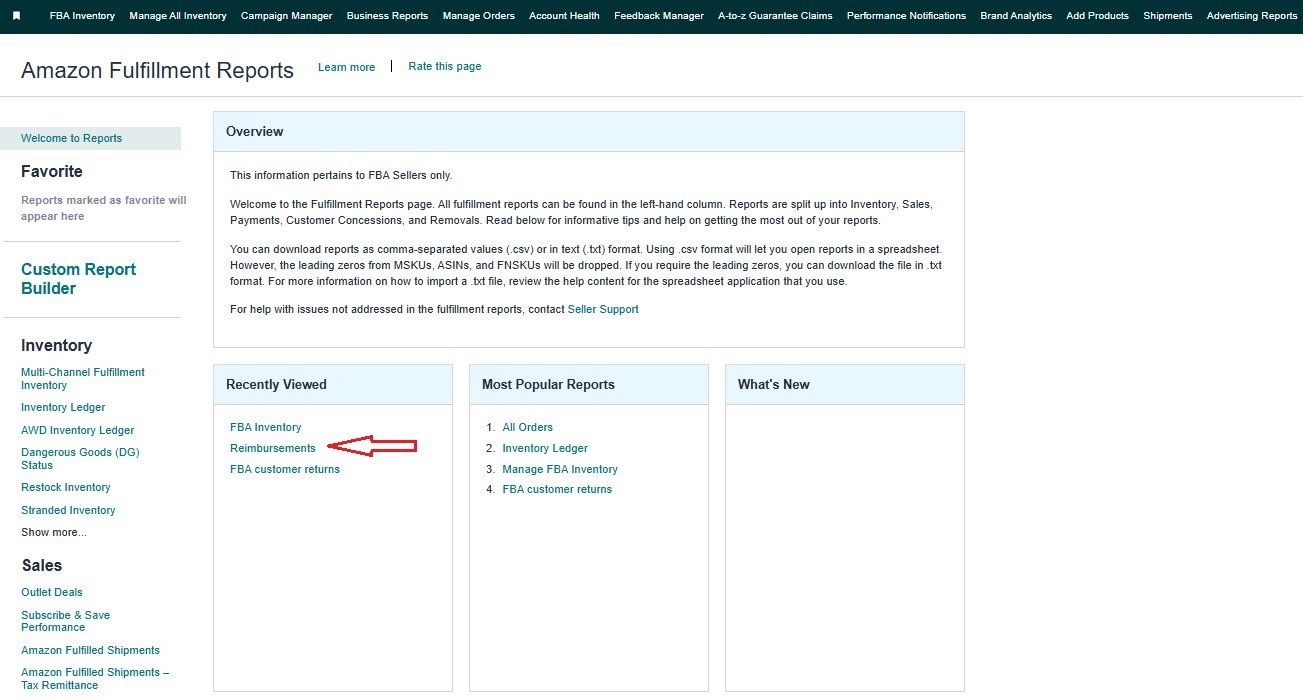
This report shows the date, reason, product, and amount for each reimbursement. You can filter by date range to track specific periods. It only shows what Amazon has reimbursed you. It doesn't show what they should reimburse but haven't yet.
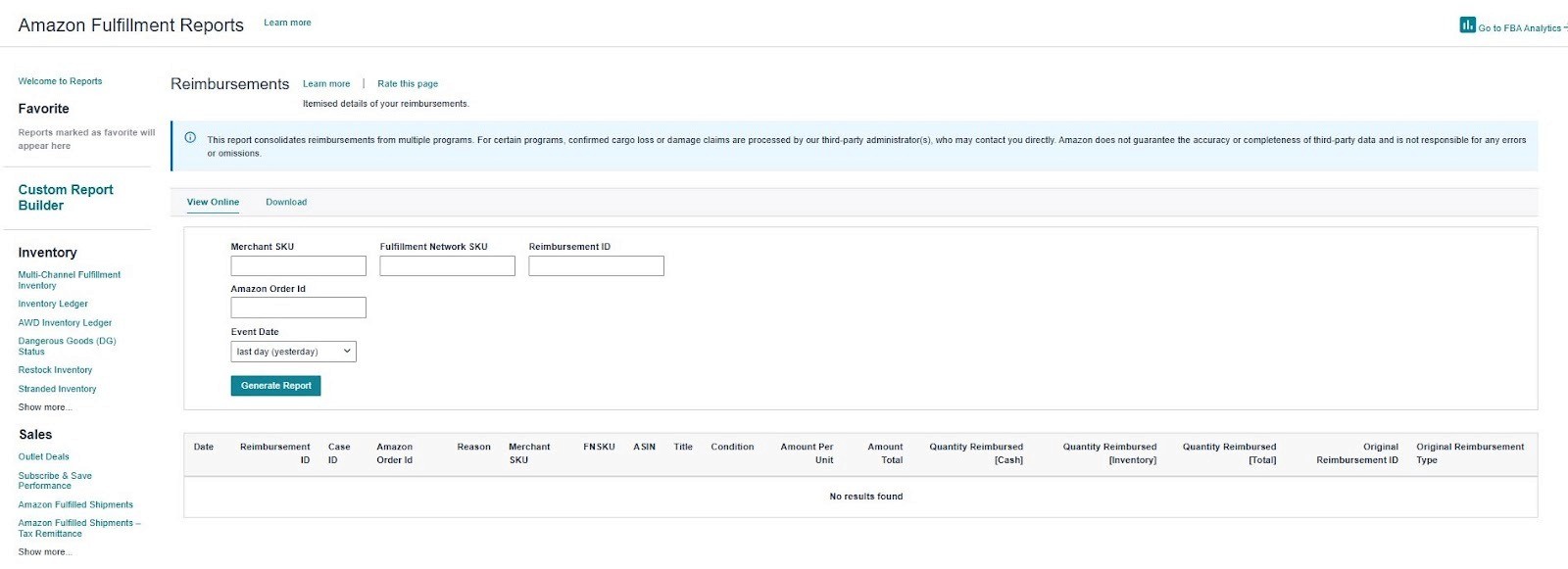
For that, you need to dig deeper into inventory reports and compare discrepancies or use Amazon automated tools that simplify the entire process.
How Amazon calculates reimbursement amounts
Since March 31, 2025, Amazon changed how many lost/damaged FBA reimbursements are calculated. In a lot of cases, they’re no longer based on your selling price; they’re based on your manufacturing cost.
That’s why you’ll see a reimbursement that feels “too low,” especially on high‑margin products. If you sell an item for $29.99 but Amazon estimates your cost at $6, you’re not getting $29.99 back anymore; you’re getting something closer to $6.
The move can cut payouts significantly for some ASINs. Your best defense: keep accurate cost records and submit your cost data when Amazon requests it, so you’re not stuck with Amazon’s (often lower) estimate.
Step-by-step process on how to get FBA reimbursements in 2026
Step 1: Identify reimbursable issues
You can't claim what you don't know is missing. Start by regularly auditing your inventory and transactions. Download your inventory reconciliation reports from Seller Central.
Compare inventory adjustments against your records
Review FBA customer returns reports for discrepancies
Check removal order reports for missing units
Analyze fee charges for obvious errors
Step 2: Gather documentation
Before filing claims, collect supporting evidence:
Screenshots of inventory reports showing discrepancies
Inbound shipment tracking information
Photos of damaged products (if applicable)
Records of your original inventory levels
Fee calculation breakdowns showing overcharges
Step 3: File your reimbursement claim
Navigate to Seller Central and follow this process:
For inventory issues:
Go to the "Help" section in Seller Central
Select "Contact Us"
Choose "Selling on Amazon" → "Fulfillment by Amazon"
Select the appropriate issue type (lost, damaged, etc.)
Provide your case details with ASIN, FNSKU, and transaction dates
Attach supporting documentation
Submit your case
For fee discrepancies:
Go to "Reports" → "Payments"
Locate the specific transaction with the fee error
Open a case through "Contact Us"
Select "FBA fees" as your issue type
Explain the error with specific order IDs and fee calculations
Pro tip: Be specific and professional in your case descriptions. Provide exact dates, order numbers, and amounts. Vague claims get rejected more frequently.
Step 4: Follow up on your claim
After submission:
Amazon typically responds within 24-48 hours
Check your case status regularly in Seller Central
Respond promptly to any requests for additional information
If denied, review the reason carefully and consider appealing
Step 5: Track your reimbursements
When Amazon approves your claim:
Reimbursements appear in your payments account within a few days
Check your "Reimbursements" report to confirm payment
Keep records of all successful claims for future reference
Manual vs. automated reimbursement recovery
Now you know the process; the challenge is time. Manual FBA reimbursement work adds up fast.
The manual approach works:
Auditing reports can take 5-10 hours per month
It's easy to miss discrepancies buried in thousands of transactions
Deadlines can slip by while you're focused on other priorities
Fee errors are particularly hard to spot without automated calculations
This is where automation changes everything. The Amazon product analysis as SellerQI scans across all reimbursement categories, including lost inventory, damaged goods, customer returns, fee errors, and removal issues. It shows you exactly what you can claim. Instead of spending hours comparing reports and calculating discrepancies, the platform does the heavy lifting automatically.
SellerQI specifically helps by:
Identifying all reimbursable issues before deadlines expire
Calculating exact amounts owed based on Amazon's latest policies
Providing clear documentation for each claim
Tracking success rates and optimizing your claim strategy
Are you missing FBA reimbursements?
An FBA refund isn't optional; it's money Amazon owes you. The difference between sellers who recover thousands and those who leave money behind is taking action. You can spend hours manually tracking discrepancies, or let SellerQI scan every category and claim Amazon reimbursement automatically.
Start a free account scan with SellerQI and protect your profits.
FAQs
How do I claim Amazon reimbursement in Seller Central?
Go to Seller Central, click Help, then Contact Us, and choose Fulfillment by Amazon. Select the issue, share details like ASIN, order ID, and dates, attach proof, and submit the case.
How to get FBA reimbursements for lost inventory?
Download your inventory reconciliation report and look for missing units. If the inventory was delivered but never received, wait 30 days and file a claim with the shipment and tracking details.
Why did Amazon deny my reimbursement claim?
Claims are often denied due to missing documents, late filing, or unclear details. Many denials can be approved later if you appeal with better proof and specific data.
Can I file a claim if Amazon already “resolved” it, but I disagree?
Yes, you can appeal by opening a new case and explaining the mismatch. Share calculations, screenshots, and reference the original case number.
Does Amazon reimburse for customer-damaged returns?
Sometimes. If Amazon accepts heavily damaged or wrong returns as unsellable, you can claim reimbursement. Normal wear and tear is usually not covered.