TL;DR
Don’t leave backend search terms empty; use the space for synonyms, long-tail keywords, and variations that Amazon’s algorithm can index.
Avoid repeating keywords already in your title, bullets, or description; it wastes space without improving rankings.
Follow Amazon’s formatting rules: no commas, no filler words, no competitor brands, and stay within the byte limit.
Only add relevant terms; stuffing in misleading or competitor keywords risks penalties and hurts conversions.
Include long-tail, conversational keywords and synonyms/abbreviations to capture more searches and boost discoverability.
Localize keywords for each marketplace instead of relying on translations; shopper behavior and terminology differ across regions.
Getting your Amazon product ranking higher isn’t just about great titles and polished bullet points; your backend search terms play a huge role, too. The problem is that many sellers either overlook this section or use it incorrectly, which silently reduces visibility.
Think about it: leaving the field blank, repeating the same words, or stuffing irrelevant terms means you’re missing out on valuable searches that could bring in the right buyers.
Backend search terms are hidden from customers, but Amazon’s algorithm uses them to understand your product better. When used correctly, they can be the difference between your product being buried in search results or being discovered by shoppers.
Let’s uncover the most common mistakes sellers make with backend keywords and show you how to fix them so your products rank higher in search, get seen by more shoppers, and drive more sales.
The mistakes Amazon sellers make with backend search terms
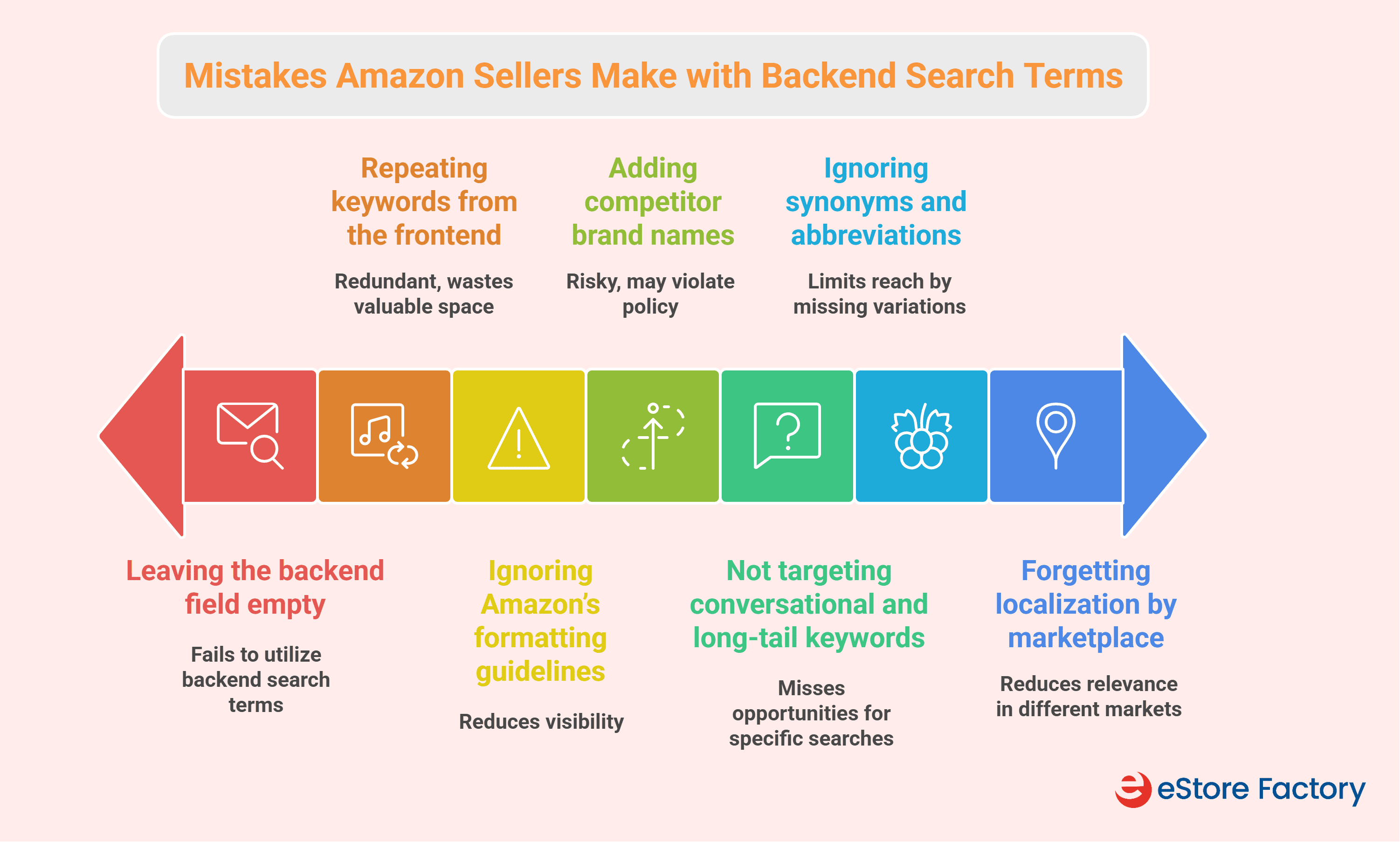
Mistake 1: Leave the field empty
One of the biggest mistakes Amazon sellers make is not using the backend search terms properly. Many either leave it empty or just add a few random words and forget about it. That’s a wasted opportunity.
Unlike your title and bullets, which need to be customer-friendly, the backend is hidden from shoppers. It’s a space purely for Amazon’s algorithm to understand your product better, and if you don’t use it, you’re missing out on higher rankings.
Here’s why it matters:
You miss indexing opportunities: Amazon’s A9 algorithm uses backend keywords to match your product with search queries. If the field is empty, you won’t show up for many long-tail or alternative keywords customers actually use.
Competitors gain an edge. Sellers who optimize their backend fields are simply visible for more searches. If they’re doing it and you’re not, they’ll keep showing up while your product gets buried.
How to fix:
Do keyword research with tools like Helium 10 or Jungle Scout, pull terms from your PPC reports, and look at what competitors rank for.
Use synonyms, long-tail variations, and logical combinations.
Skip duplicates, filler words, and irrelevant terms. Keep it within the byte limit and review it often as trends change.
Mistake 2: Repeat keywords from the frontend
Another mistake sellers often make is copying the same keywords from their title, bullets, or description into the backend search terms. At first, it feels logical: “if I repeat a keyword more times, maybe I’ll rank higher.”
But that’s not how Amazon’s algorithm works. Unlike old-school Google SEO, Amazon doesn’t reward keyword stuffing. Once a word is in your listing, the system already indexes it. Adding it again in the backend is like writing it twice on the same page; it doesn’t give you extra points.
Here’s why it matters:
You waste valuable space in the backend that could have been used for new keywords.
Repetition limits your organic reach because you’re not adding any new search terms that customers might actually be searching for.
Overloading the backend with duplicates can even confuse the algorithm, making your listing look less optimized.
How to fix:
Audit your listing first. Note down which keywords are already on the front end. Then, use the backend only for unique, incremental terms such as synonyms, long-tail phrases, misspellings, or abbreviations.
This approach ensures every single character in your backend field works toward expanding visibility, not wasting space.
Mistake 3: Ignore Amazon's formatting guidelines
Another mistake Amazon sellers often make is not following Amazon’s rules for how backend keywords should be formatted. At first glance, it may not seem like a big deal, but even small errors like adding commas, stuffing in “stop words,” or going over the byte limit can prevent your keywords from being indexed.
In some cases, Amazon may even ignore the entire field for that ASIN, meaning all the work you put into those keywords becomes useless.
Here’s why it matters:
When you use incorrect punctuation or unnecessary words such as “and,” “the,” or “with,” you’re wasting space that could be used for meaningful keywords. The real problem is that if you exceed the 249-byte limit.
Amazon’s algorithm doesn't index your backend search terms if you include things Amazon doesn’t allow, like competitor brand names, ASINs, or claims such as “best” or “cheapest.” You risk listing suppression or even account penalties.
How to fix:
Keep your formatting clean: use single spaces between words, no commas, no semicolons, and no punctuation.
Stick to lowercase; it doesn’t affect indexing, but it keeps things simple.
Focus only on valuable, unique keywords that aren’t already in your title or bullets, and avoid repeating the same words.
Use either singular or plural, not both, since Amazon’s algorithm can choose variations automatically.
Mistake 4: Add competitor brand names
This is one of the most damaging mistakes you can make with backend search terms. Some sellers think they can “capture” traffic by slipping a competitor’s brand name into their keywords.
Here’s why it matters:
Using another company’s trademark without permission is an IP violation. Competitors can (and do) file complaints, which may lead to your listing being taken down, your account suspended, or even legal action.
Amazon’s algorithm is built to ignore competitor brand names in the backend field. That means all those characters you used are doing nothing for your visibility.
How to fix:
Use competitor research as insights, not as something to copy. Look at what your competitors highlight in their titles and bullets, features, benefits, or use cases, and turn those into non-branded keywords for your own listing.
Stick to descriptive, feature-based terms like “insulated travel mug” or “leakproof coffee tumbler.” If you really want to target competitor traffic, use Amazon PPC management designed for conquesting instead of risking your organic listing.
Mistake 5: Not targeting conversational and long-tail keywords
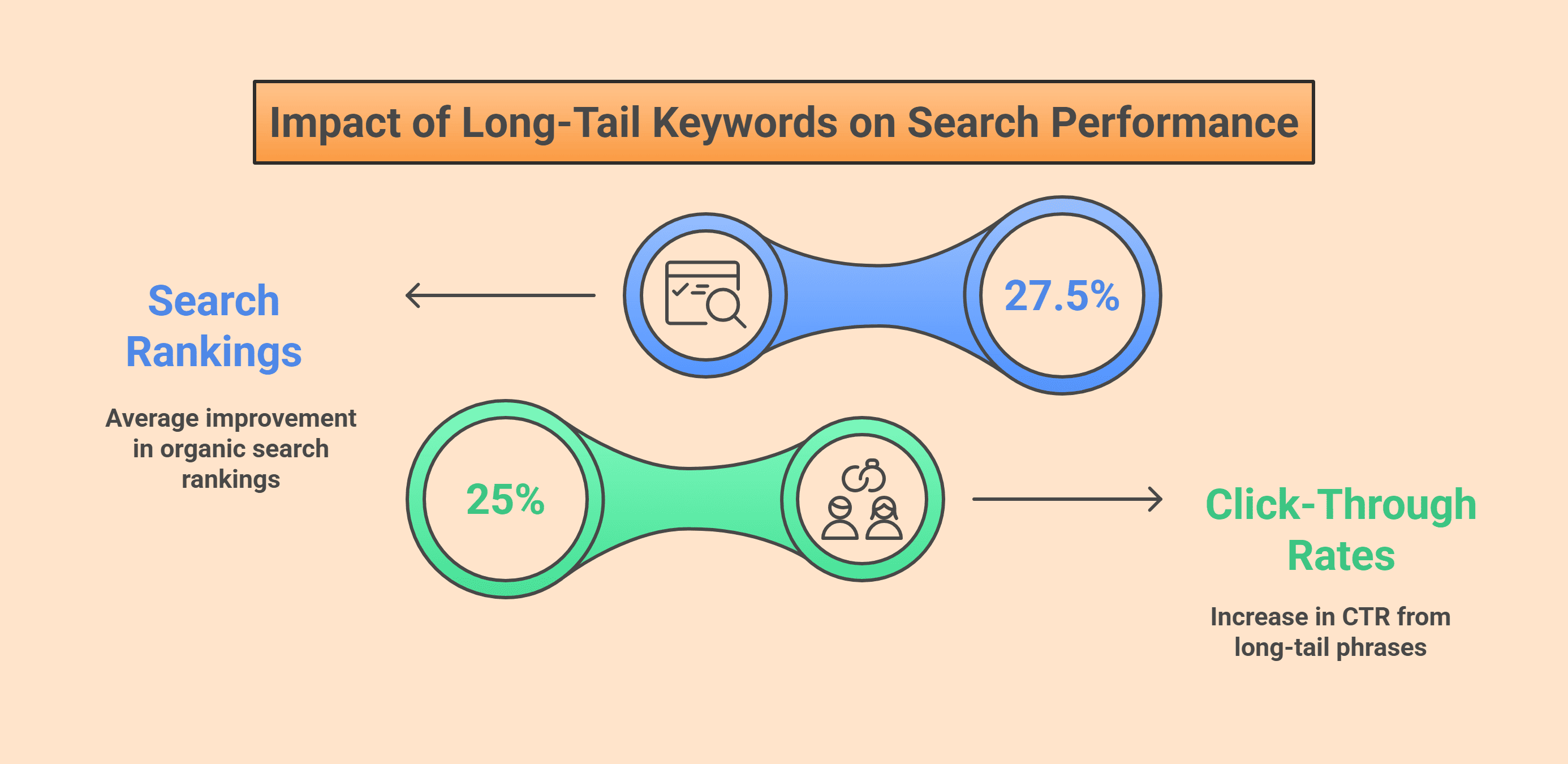
Many sellers get stuck chasing only short, high-volume keywords. But they’re extremely competitive, and they don’t always bring the right kind of traffic. By ignoring conversational and long-tail keywords, you’re leaving out the searches that often matter most.
How long-tail keywords boost rankings and CTR
Here’s why it matters:
Buyers using long-tail terms already know what they want. Someone searching “insulated travel mug with handle” is far more likely to buy than someone just typing “mug.”
Broad keywords often attract casual browsers who aren’t ready to purchase. That lowers your conversion rate, which in turn signals to Amazon that your listing isn’t the best match.
Short keywords are dominated by big brands with deep pockets. Long-tail keywords give smaller sellers a chance to capture visibility in specific niches.
You lose voice search traffic because more people search in natural, conversational language. If you’re not including those phrases in your backend, you’re missing a growing source of traffic.
How to fix:
Think like your customer. Read reviews and Q&A to see how people describe your product. Use Amazon’s autocomplete suggestions for long-tail ideas.
Check your PPC search term reports for exact phrases customers type, and don’t forget keyword tools like Helium 10 or Jungle Scout to expand your list.
Focus on specific features, benefits, and use cases that don’t fit neatly in your title or bullets.
Mistake 6: Ignore synonyms and abbreviations
Many sellers make the mistake of only using the “obvious” keywords for their product. For example, if you sell Bluetooth earbuds, you might only target that exact phrase.
But the reality is customers search in many different ways; some type wireless earphones, others use BT earbuds, and a few might even type a common misspelling. If you only stick to one version, you miss out on all the other ways people are looking for your product.
Here’s why it matters:
You miss search traffic. Different shoppers use different words. If you don’t include synonyms or abbreviations, your product simply won’t appear for those searches.
It has lower discoverability. Without covering multiple variations, your listing only reaches a small slice of your potential audience.
Less traffic means fewer sales. With fewer clicks, your overall sales performance drops, which can signal to Amazon that your listing isn’t as relevant as competitors.
How to fix:
You should use more keyword variations. Think about all the different words people might use to search for your product.
Look at competitor reviews and Q&As; customers often describe products in their own language, which can give you terms you wouldn’t have thought of. Done right, this simple step can unlock more traffic and more sales.
Mistake 7: Forget localization by marketplace
One of the biggest mistakes global Amazon sellers make is assuming that a single set of keywords works everywhere. Many sellers just copy their U.S. keywords, run them through Google Translate, and paste them into other marketplaces like the UK, Germany, or Japan. The real problem is that language, culture, and search habits vary widely between regions, and ignoring this costs you rankings and sales.
Here’s why it matters:
You miss local searches. A classic example: in the U.S. people search for diapers, while in the UK, they search for nappies. If you only use “diapers” in your UK backend, you’ll lose many potential buyers.
Amazon’s algorithm in each marketplace is tuned to local search behavior. If your keywords don’t match what locals actually type, your product simply won’t rank well.
You waste money on ads. Running PPC with poorly localized keywords means you’re paying for clicks that don’t convert or, worse, not showing up for the right searches at all.
Fewer sales. At the end of the day, failing to localize keywords means lower visibility, less traffic, and fewer conversions.
How to fix:
Do keyword research separately for each marketplace. Use Amazon’s autocomplete to see what real shoppers type in each country.
Check reviews and competitor listings to pick up on local terminology.
You can also hire a native speaker or translator; they’ll spot cultural terms and slang that tools often miss.
Localizing isn’t extra work; it’s the difference between blending in and actually being discovered in each marketplace.
Final note
Optimizing backend search terms is not complicated, but ignoring them can quietly kill your Amazon product optimization. From leaving fields blank to repeating keywords or adding irrelevant terms, these mistakes directly cost you visibility, traffic, and sales.
When you optimize correctly, backend keywords quietly work in the background to expand your reach. To make things easier, choose SellerQI, an AI-powered root cause analysis tool that can help you research keywords, find gaps, and monitor performance.
Take the time to refine your backend now; it’s a small effort that can bring big, long-term results.
Contact us today and start your free analysis!